


Everything at a glance
- Make speed and stability the standard: a fast host, a lean theme, a strict plugin diet and HTTPS everywhere.
- Design a clear structure: pillar pages, clusters, breadcrumbs and internal links that show what matters.
- Publish helpful, thorough content: match search intent, optimise snippets and schema, and earn links with genuine added value.
- Watch the changing SERP: AI Overviews and rich results reward clear structure and schema.
- Iterate with data: use PSI, Search Console and your SEO plugin’s reports in order to prioritise the biggest levers first.
Search rewards the best answer, delivered fast. If your pages do not match real search queries, do not load quickly on every device and do not make the next step clear, you disappear at exactly the moment when intent is highest.
WordPress supplies the toolbox: speed of publishing, flexible themes, capable plugins. But WordPress SEO is won through decisions made behind the scenes: a host that stays fast under load, a lean theme without bloat, plugins that create structure rather than chaos, and settings that keep URLs clean, crawlable and consistent. If there is no time for that tuning, a WordPress SEO agency takes on the technical side, speed and structure.
From there, everything compounds. A clear site architecture shows Google what matters. Considered internal links strengthen your pillar pages. Schema helps search understand your pages; Core Web Vitals make them feel instant. That is how you reach people exactly when they are searching, and win clicks, trust and revenue without shouting.
What role does hosting play in WordPress SEO?
Fast hosting makes everything easier, from Core Web Vitals to crawl budget. Choose servers that are optimised for WordPress and you will feel it on every page. A good host also takes care of security, backups and updates, so that you can invest your time in content and growth.
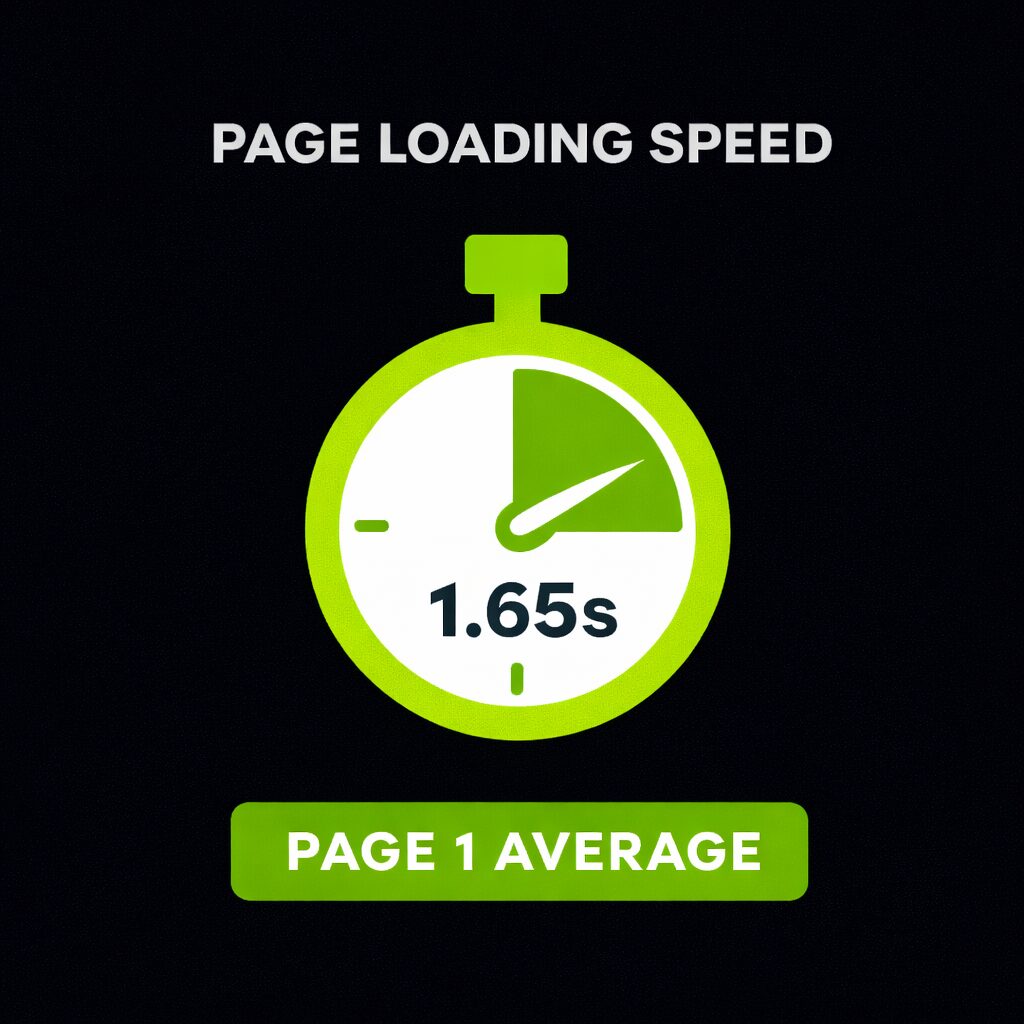
A quick reality check: in Backlinko’s 2025 page speed analysis, Google results on page 1 loaded in roughly 1.65 seconds on average. Speed counts. (Backlinko)
SEO requirements for high-quality hosting
- Speed basislow time to first byte (TTFB), HTTP/2 or HTTP/3, server-side caching and SSD/NVMe storage. Semrush is a reminder here: the median number of HTTP requests is around 76 on desktop and around 70 on mobile, and faster servers plus smart asset handling keep that in check. (Semrush)
- Security and reliabilityfree SSL (Let’s Encrypt), WAF, DDoS protection, automated daily backups and one-click restores. Managed WordPress hosts usually bundle all of this.
- Workflow featuresstaging environments, integrated CDN/edge caching and versioned PHP. That lowers the risk of breaking the live site and lets you test performance tweaks safely.
Recommended WordPress hosting providers
Choose a provider that is genuinely optimised for WordPress and for your traffic level:
- WP Enginemanaged WordPress with EverCache®, edge CDN, staging and strong security. Ideal for companies and agencies.
- Kinstabuilt on Google Cloud, with global data centres, proactive security and migrations; regularly praised in 2025 roundups.
- SiteGroundsolid performance for SMEs and a practical Speed Optimizer plugin for passing CWV when configured correctly.
- HostPress (DE)managed WordPress hosting with a focus on performance and SEO, if you serve DACH markets.
Expert tip
Use a CDN for an international audience; for a local audience, choose a data centre close to your users in order to reduce latency.
From our day-to-day client work
How does your WordPress theme affect SEO?
Themes control layout, scripts and markup. That means LCP, CLS and INP are shaped by the theme just as much as by the host. Choose lean, accessible and well-maintained themes so that speed is the default.
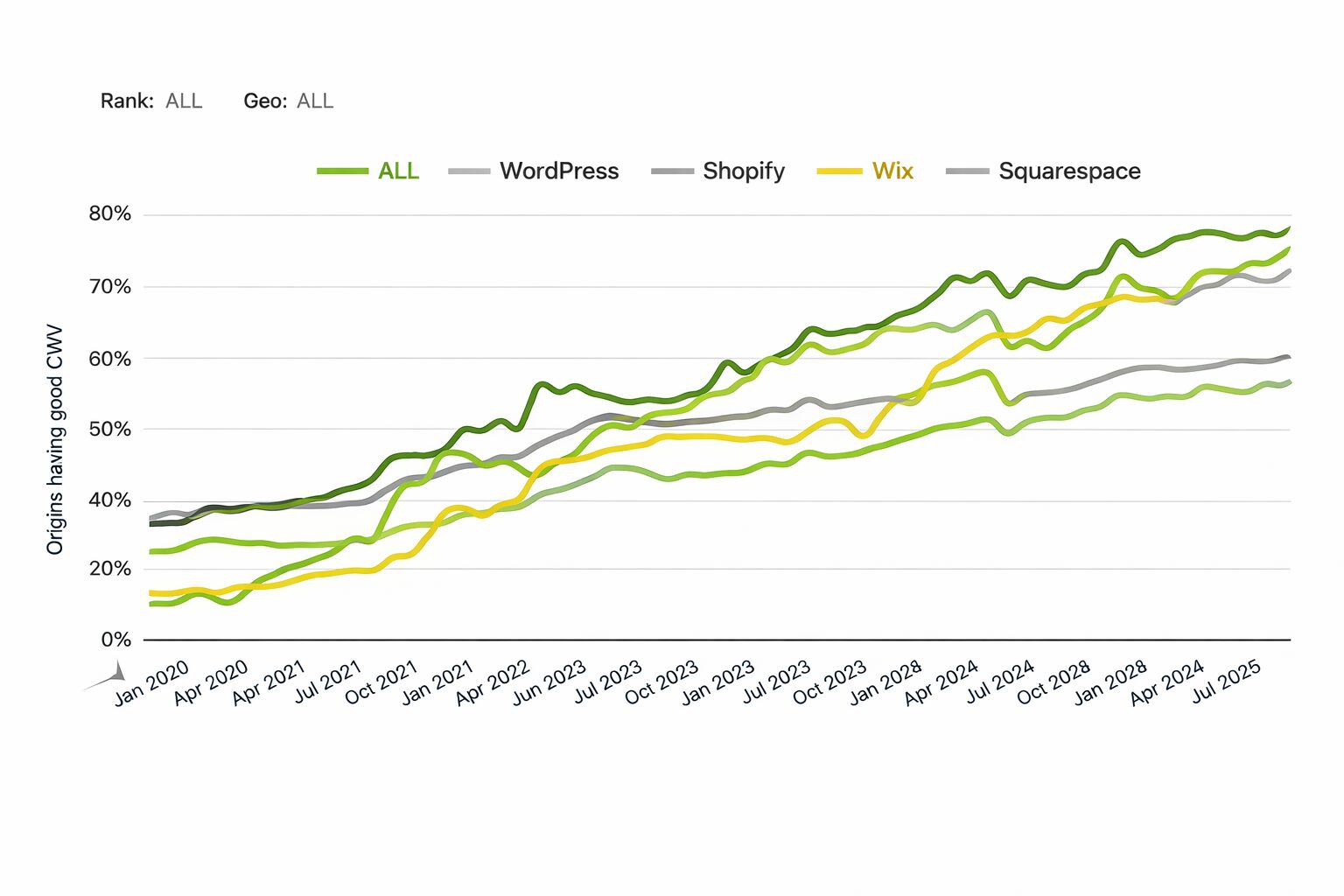
In 2025, only around 43.4% of WordPress sites pass the Core Web Vitals. A fast theme is not a nice-to-have, it is your competitive advantage. (Core Web Vitals Technology Report)
SEO factors when choosing a theme
- Performance firstclean code, minimal dependencies and strong mobile scores out of the box. Test the theme demo in advance with WebPageTest or PSI.
- Accessible, semantic HTMLa clean heading hierarchy (one H1, logical H2 to H6), visible focus states, ARIA where needed.
- Maintenance and securityfrequent updates, active support and community, and compatibility with the block editor.
Proven theme providers with an SEO focus
- Astralightweight, mobile-friendly, SEO-ready; regularly named in “fastest themes” lists in 2025.
- GeneratePressa minimal footprint, tight performance and excellent documentation.
- Kadencestrong Core Web Vitals defaults plus performance controls.
Tip: test shortlisted themes on a staging site with your real plugins and content before launch.
Chapter summary
- Hosting and theme together decide LCP, CLS and INP — both are SEO work, done before the first line of text exists.
- A good host bundles the speed basis, security and workflow features (staging, CDN, versioned PHP) into one package.
- Only around 43.4% of WordPress sites pass the Core Web Vitals, which makes a lean theme a genuine competitive advantage.
- Always test shortlisted themes on a staging site with your own plugins and content, not just on the demo.
Which plugins improve WordPress SEO?
Plugins close gaps: sitemaps, structured data, breadcrumbs, redirects and more. Keep the stack small and purposeful. Quality beats quantity.
As a signal of trust and support, Yoast SEO records 10+ million active installations in the WordPress directory (2025), which makes it a safe standard.
Source: WordPress.org
Choose one SEO plugin (Yoast or Rank Math). Running two in parallel causes conflicts and duplicate meta output.
Essential Yoast SEO configurations
- Run the first-time configuration, enter your organisation or person details and connect Search Console.
- Activate breadcrumbs (and insert them in the theme), control index/noindex for thin archives and use the redirect and schema features where relevant.
- Do not chase green traffic lights; use the focus keyphrase hints as training wheels, not as gospel.
- Set Media → attachment URLs to redirect.
- Consider noindex for tag archives and disable date and author archives if you do not need them.
- Generate XML sitemaps and submit them in Search Console.
- Define templates for SEO titles and meta descriptions; readable rather than stuffed.
Overview: The SEO Framework
A lightweight alternative with sensible defaults, a focus on performance and integrated structured data. Good for minimalist setups. (Active installations in the hundreds of thousands according to the WordPress.com directory as of May 2025.) (WordPress.com)
Rank Math for advanced users
- Granular schema types, WooCommerce SEO, a redirect manager and rich snippet controls. Popular with power users; active installations are listed in the millions on wordpress.org.
- Use the 404 Monitor and Redirections modules in order to spot broken paths and set 301s.
- Rank Math supports several focus keywords in the free version. Use them sparingly, to guide the on-page structure rather than to chase scores.
Additional plugins for performance, structure and snippets
- Caching and optimisationWP Rocket, W3 Total Cache or host-side optimisers.
- Image optimisationSmush, ShortPixel, EWWW Image Optimizer.
- Redirectsthe Redirection plugin for managing 301s after URL changes.
- Schemabuilt in (Yoast/Rank Math) or Schema & Structured Data for WP & AMP.
TenWeb Booster (automated speed optimisations) and WP Fastest Cache (simple caching) are good alternatives. For images, Smush or EWWW Image Optimizer help with compression and lazy loading.
Expert tip
Every new plugin should either speed things up, improve the structure or unlock a capability you genuinely use. If it does none of those, leave it out.
From our day-to-day client work
Which basic settings are decisive for WordPress SEO?
Small switches, big effect. Set this up before your first post and save yourself hours later.
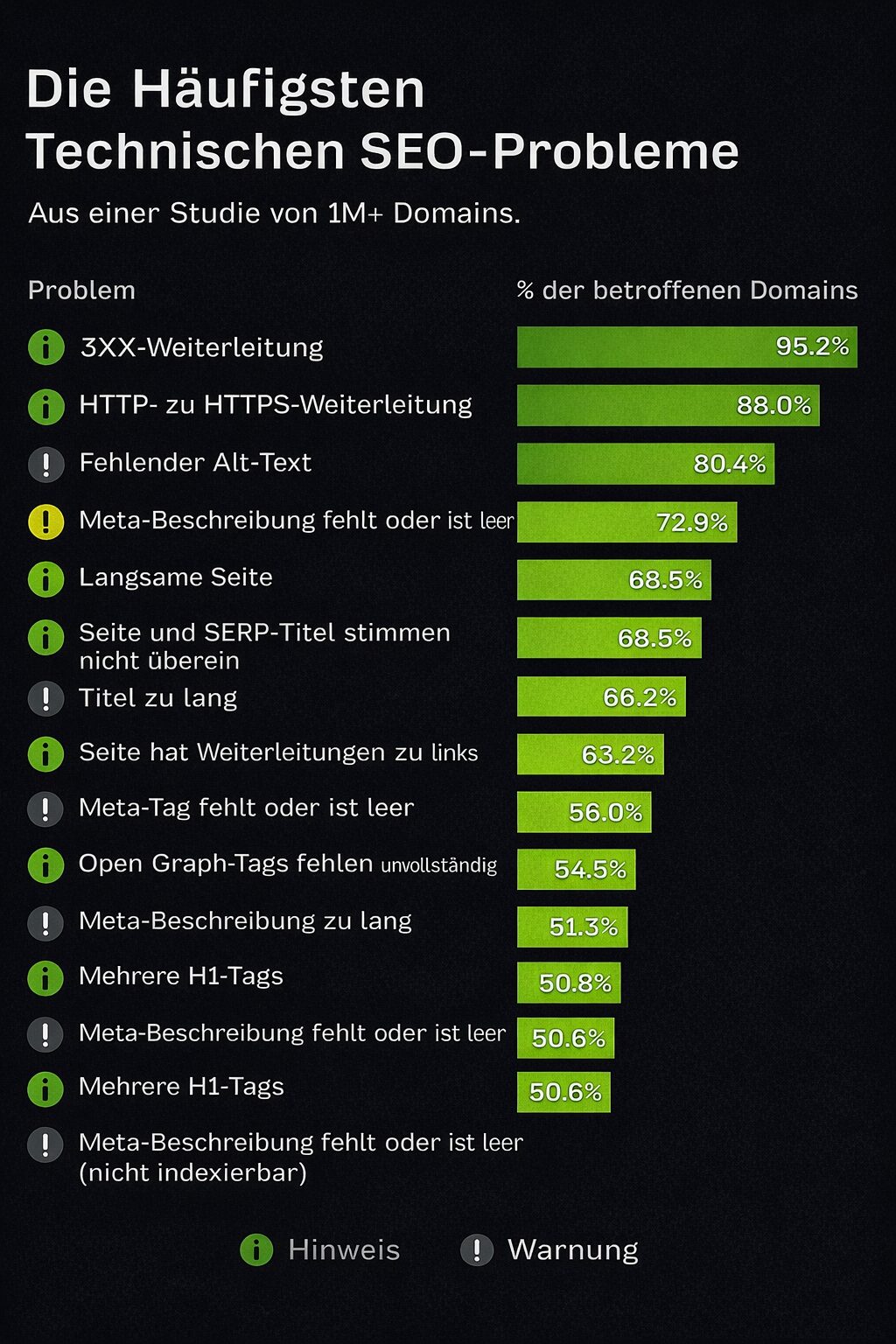
A note on security: 88% of websites have problems with HTTP to HTTPS redirects, according to Ahrefs’ technical SEO analysis, so a clean HTTPS configuration is mandatory. (Ahrefs)
Visibility for search engines
Common mistake
Under Settings → Reading, make sure that “Discourage search engines from indexing this site” is switched off. It is easy to forget after a dev build. (Many reputable WP SEO guides name this as the first step.)
Subdomains vs subdirectories
In most cases, keep content under one hostname domain (for example example.com/blog/) rather than blog.example.com. Subdirectories consolidate authority and simplify analytics, unless you genuinely need separation.
www vs non-www
Choose a canonical preference in Settings → General and force a 301 for the other version. The Domaintechnik guide shows how to check which version Google indexes more strongly and then redirect accordingly. Decide early and stay consistent, so that backlinks consolidate cleanly.
SSL and HTTPS
Install SSL (often one click with your host), set the WordPress address and site address to https:// and enforce HTTPS. Most modern sites use HTTPS; among the top 1 M the rate is over 93%. (W3Techs+1)
URL structure and permalinks
Under Settings → Permalinks, use Post name (clean and human-readable). Avoid dates in URLs except for news. Keep slugs short and descriptive.
Use Post name for concise URLs. If you change an existing structure, set 301 redirects for every legacy URL in order to avoid losses in traffic and rankings. Also activate the option in your SEO plugin to redirect media attachment URLs to the file or to the parent post, in order to avoid thin pages.
Multilingual SEO
Prefer subdirectories per language (/de/, /en/) with correct hreflang tags. Ahrefs’ 2025 update on Core Web Vitals and INP is also a reminder to keep an eye on interactivity in all language versions: fast everywhere.
Sitemap integration
Since WordPress 5.5, core can generate an XML sitemap. With Yoast or Rank Math, one sitemap should “win” and be submitted in Google Search Console.
Disable the media/attachment sitemap in your SEO plugin if it is being generated. Those URLs do not belong in the index.
robots.txt and .htaccess basics
Use robots.txt for crawl control (never to hide sensitive data) and .htaccess for redirects and canonicalisation on Apache. The Domaintechnik guide covers both cleanly.
Monitor 404 errors and set 301 redirects for removed or renamed pages, in order to preserve link equity and crawl efficiency.
Chapter summary
- The indexing tick under Settings → Reading has to go — everything else stays ineffective while it is set.
- Content belongs in subdirectories rather than on subdomains: that consolidates authority and simplifies analytics.
- One canonical version (www or non-www), HTTPS everywhere and permalinks on post name — decide once, then stay consistent.
- Exactly one sitemap wins and gets submitted in Search Console; the media and attachment sitemap stays out of the index.
- Every change to the structure needs 301 redirects, otherwise the rebuild costs traffic and rankings.
Free, no obligation
Where does your website actually stand?

We look at your rankings, your technical setup and your visibility in AI answers, then tell you which lever moves the needle next.
How do you structure your WordPress website for SEO?
Structure helps readers and bots.
Think “topics first”: categories, tags and internal links show Google what matters.
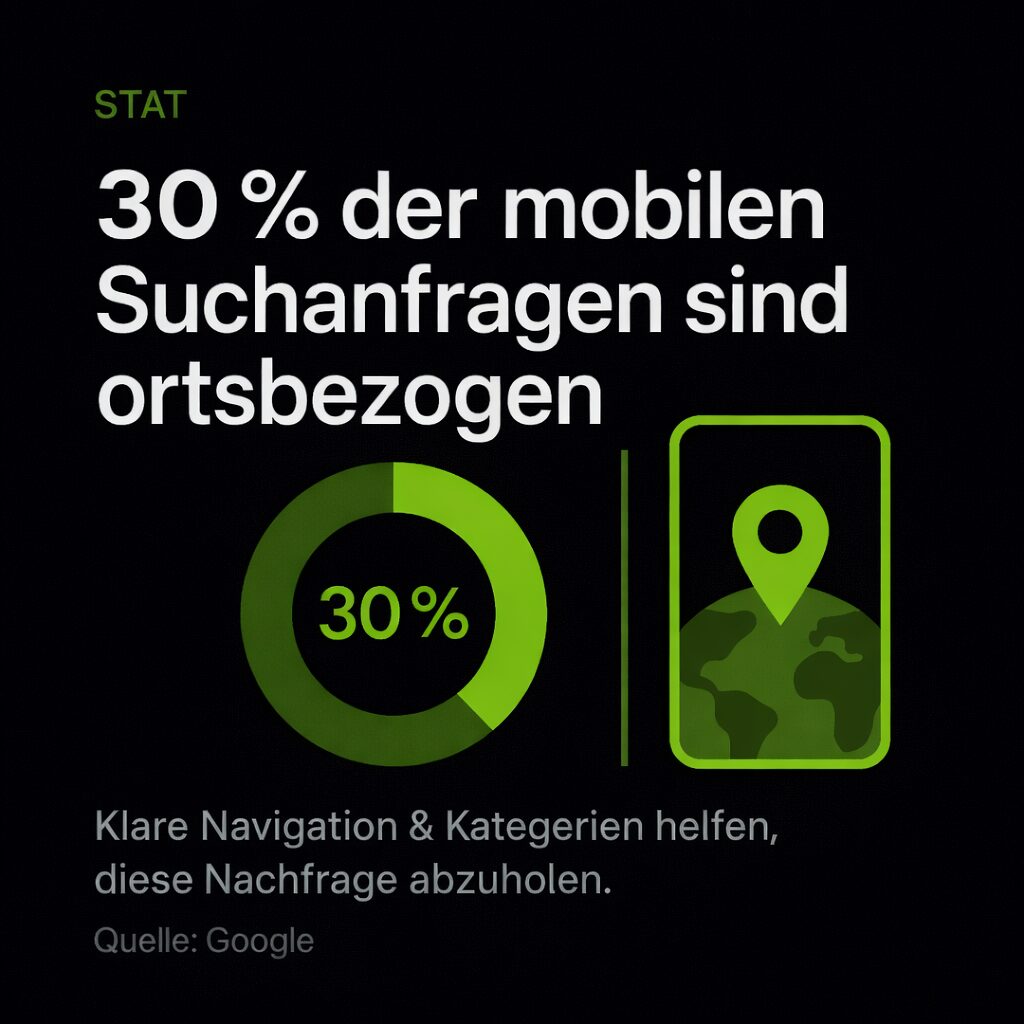
A global view: according to Google, around 30% of all mobile searches are location-related, and clear navigation and categories help you capture that demand. (Ahrefs)
Pages vs posts
- Pages: evergreen (home, services, about us).
- Posts: timely content (guides, news). Create “pillar” pages for core topics and support them with matching posts that link back internally.
Using categories and tags sensibly
- Categories = broad topics you want to rank for (each with an optimised archive page).
- Tags = optional, for discovery; do not create dozens of them with only one post each. A tidy taxonomy, a few strong categories, beats tag soup.
Set tags to noindex if their archives offer no value of their own; they often produce duplicate or thin pages. Keep categories indexable if you add editorial content to the archive (an intro, FAQs, curated links).
For many sites, disable date and author archives (or set them to noindex) in order to avoid duplicate content, especially on single-author sites.
Breadcrumb navigation
Activate breadcrumbs in your SEO plugin and insert them into your templates. This improves UX and gives search engines helpful context in the SERPs.
If author and date archives are disabled or set to noindex, breadcrumbs should point to category or parent page paths.
Topic clustering and content silos
Group related posts under one pillar, link them to each other and remove orphans. The HostPress logic of a hub, spokes and consistent internal linking is a good mental model.
Tip: after every new publication, immediately add two to three internal links from older, relevant posts in order to strengthen the cluster.
How do you optimise content for WordPress SEO?
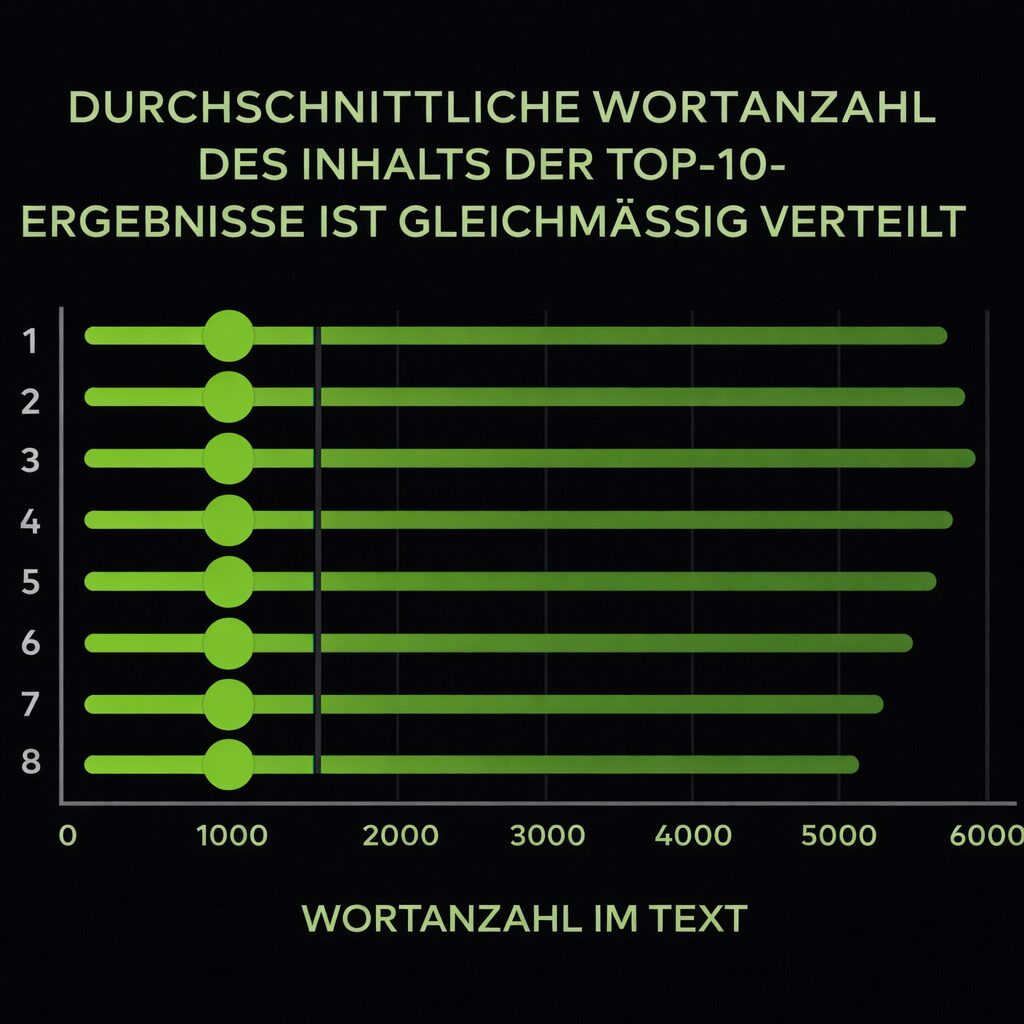
A good-looking WordPress site is great, but what keeps readers (and brings them back) is the content. Start with what searchers actually want, structure it clearly and then polish it with built-in tools plus a smart SEO plugin. As a useful benchmark, a 2025 Backlinko study showed that page 1 results run to around 1,447 words on average, not because length alone wins, but because complete answers win attention. (Backlinko)
Keyword research as the foundation of your success
If you want predictable growth in Google, you have to cover the right topics with the right intent. Research in a focused way, group related queries into clusters and assign one primary intent to each page. Take your time: structure and internal linking follow from this. Rule of thumb: if the SERP shows different page types (guide vs tool vs comparison), treat these as separate pieces of content.
Writing SEO copy
“How do I write content that ranks and converts?” Keep it human and useful:
- Start with the answer, then show steps, examples and evidence.
- Forget “keyword density”. Clarity and relevance count for more.
- Use secondary keywords for subheadings or supporting paragraphs, but only where they fit naturally.
HTML headings
Headings are your page plan. One H1 (usually the title), then structure hierarchically (H2 to H3). Headings should reflect the subtopics people search for. No stuffing; write them so they are descriptive and scannable.
Google snippets and smart use of SEO plugins
Your snippet (title tag plus meta description) is the first handshake in search. A clear promise in the title, the benefit in the description. Your SEO plugin shows a preview and sets the schema type (for example Article, FAQ, Product), so that the page is understood correctly and qualifies for rich results. The focus keyphrase is an aid, not a score that has to “turn green”.
Primary keyword: place it naturally in these high-signal spots
- Title tag
- H1
- URL slug
- The first 100 words
- One relevant H2
- The file name and alt text of the first relevant image (only if it really describes the image)
Image SEO
Google does not read pixels, it reads context.
Describe images plainly and keep them fast:
- File name: short and descriptive, separated by hyphens.
- Alt text: what the image shows or does (no stuffing).
- Caption and title: only if it helps users.
- Format and size: WebP/AVIF where possible; use appropriately dimensioned images; compress them; lazy-load anything below the fold.
- Keep your LCP image lean and correctly dimensioned.
Content design and optimisation
Publishing text is step one. Make it consumable:
- A subheading roughly every 150 to 300 words, which is good for scanning and for a sensibly generated table of contents with jump links.
- Keep paragraphs short (around 3 to 5 lines on desktop).
- Use visuals (images, short clips, diagrams) where they create clarity.
- Emphasise key points sparingly with callouts or light highlighting, so that the page stays clean.
Links
Internal and external links have different jobs. Use both well.
Internal links: good internal linking keeps users on the site and shows Google which pages are most important. Connect new posts to their pillar pages with descriptive anchors and fix or redirect broken paths, so that no link equity is lost.
External links: citing credible sources is normal and helpful. Link out where it improves understanding. Use special attributes only for special cases: rel=”sponsored” for paid or affiliate links, rel=”ugc” for user-generated links and rel=”nofollow” only when you cannot vouch for the target. Natural, editorial citations need no extra tags.
Content is king, if it is found, understood and pleasant to read. Do the intent work, structure it clearly and let WordPress plus your SEO plugin handle the fine detail.
Chapter summary
- Clarify the search intent first: one primary intent per page, and different SERP formats become separate pieces of content.
- Headings are the page plan — one H1, then a clean hierarchy, with a subheading roughly every 150 to 300 words.
- The primary keyword belongs in a few high-signal spots, not in every paragraph; the focus keyphrase is an aid, not a score.
- Images need short, descriptive file names, honest alt texts, modern formats and a lean, correctly dimensioned LCP image.
- Internal links lead to the pillar pages, external links back up statements — special attributes only for paid, user-generated or untrusted targets.
What are advanced strategies for WordPress SEO?
Once the basics are running, focus on the mobile experience, speed engineering, structured data and links. That amplifies everything you have built.
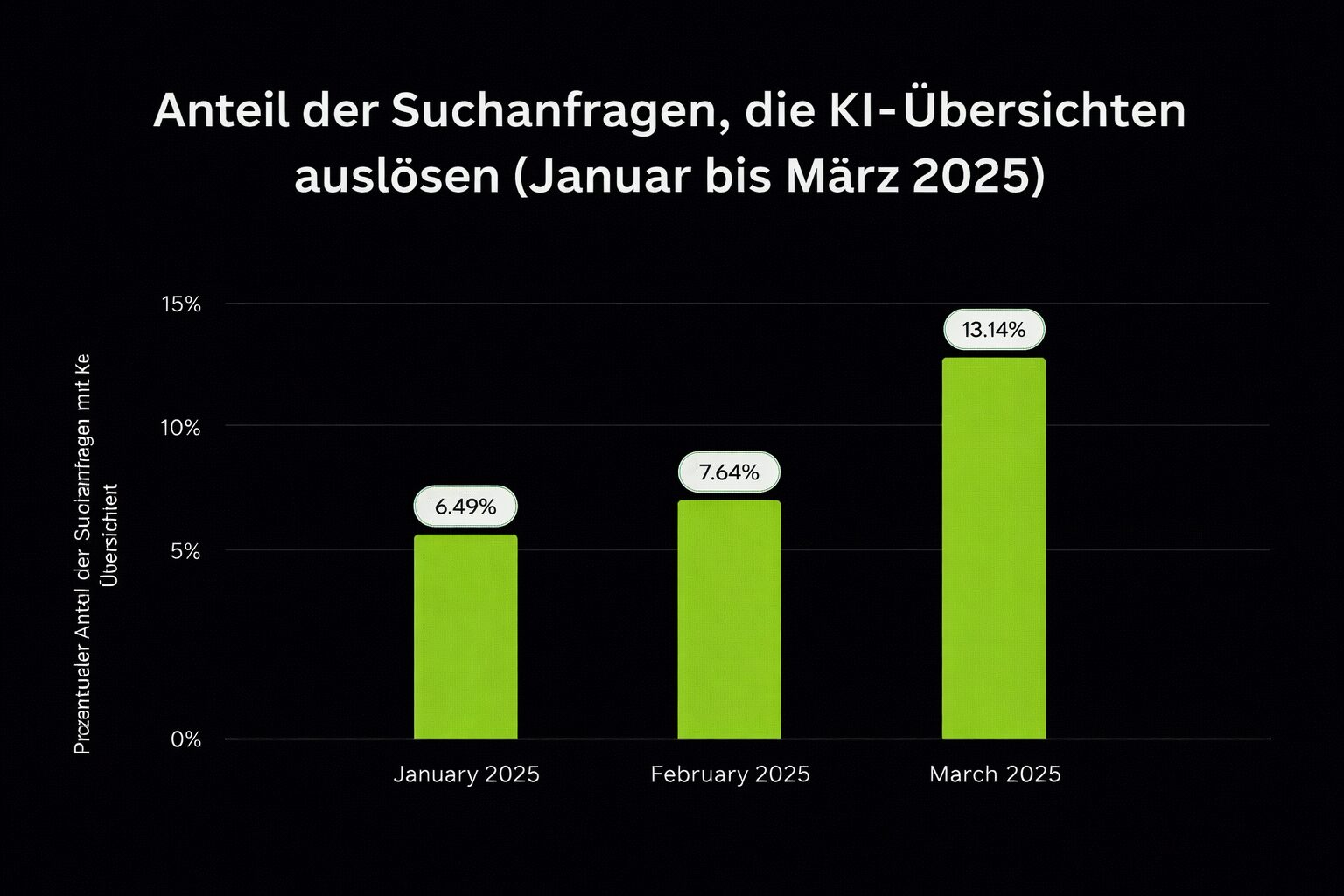
A SERP shift: Semrush reports that AI Overviews now appear in 13%+ of searches (July 2025), so structured, helpful content and solid FAQ/how-to markup increase your visibility. (Semrush)
Mobile SEO and responsiveness
In many regions the bulk of traffic arrives on mobile, so design and test mobile-first. Legible fonts, generous touch targets, optimised media. Validate with the device toolbar in Chrome DevTools and the PSI mobile view.
Improving site speed and performance
- Edge caching and CDN for global audiences.
- Minify and defer JS/CSS; reduce requests; ship only what you use.
- Optimise LCP (the hero image), CLS (reserve space) and INP (limit main thread work). Ahrefs’ 2025 update stresses INP as the successor to FID, so focus on interactivity across all templates.
Measure with PageSpeed Insights and fix whatever influences LCP/INP/CLS. Combine host and CDN caching with a site tool such as WP Fastest Cache or TenWeb Booster and compress images via Smush or EWWW. That lowers load times and lifts conversions.
Adding structured data and schema markup
Set the appropriate schema types in your plugin (Article, Product, LocalBusiness, FAQ). Mark up ratings, prices and FAQs carefully and keep them honest; the Domaintechnik guide shows why this increases your chances of rich results.
Sustainable link building for WordPress
Earn links with original research, useful tools and visual explainers. For local sites, build citations and sponsor relevant community pages. Correlation studies continue to show that the number of referring domains correlates strongly with better rankings, and that quality and variety count for more than raw volume.
Expert tip
Publish “linkable assets” every quarter (data studies, templates or calculators) and pitch them to niche newsletters. Steady, cumulative growth beats peaks.
From our day-to-day client work
Keep a simple routine: run a 404 and redirect check, review Search Console coverage and re-crawl your core templates after theme or plugin changes.
Quick reference: WordPress-specific checklist
- Set up the basics
- A managed host with SSL, WAF, backups, staging and CDN/edge.
- A fast, accessible theme, checked with PSI/WebPageTest (the demo first).
- An SEO plugin installed and configured (sitemaps, breadcrumbs, schema).
- Lock down the settings
- Reading: search engine visibility not discouraged (remove the tick).
- Permalinks: post name; short slugs.
- General: choose www or non-www, force a 301; switch to HTTPS everywhere.
- Structure for growth
- Pillars (pages) plus clusters (posts), tidy categories, few tags, breadcrumbs.
- Update internal links with every publication.
- Deliver better content
- Answer the query in full (depth > word count), with headings, images and sources.
- Compress images, lazy-load them and set descriptive alt texts.
- Go advanced
- Improve INP, LCP and CLS; monitor them with Search Console.
- Add schema for rich results; submit and validate in Search Console.
- Build links steadily; prioritise referring domains from relevant sites.
Frequently asked questions
Yoast or Rank Math — which SEO plugin should I choose?
Both work. Yoast, with more than 10 million active installations, is the safe standard; Rank Math offers granular schema types, WooCommerce SEO, a redirect manager and several focus keywords even in the free version. What matters is this: choose one of them. Two SEO plugins in parallel cause conflicts and duplicate meta output. If you prefer something especially lean, The SEO Framework is a lightweight alternative with sensible defaults.
Which permalink setting is the right one for SEO?
Under Settings → Permalinks, use Post name — clean, human-readable and short. Avoid dates in URLs except for news. If you change an existing structure, set a 301 redirect for every legacy URL, otherwise the rebuild costs traffic and rankings.
Should tag, date and author archives be indexed?
Usually not. Tag archives belong on noindex if they offer no value of their own, because they often produce duplicate or thin pages. Date and author archives can be disabled or set to noindex on most sites, especially single-author ones. Categories may stay indexable if you add editorial content to the archive: an intro, FAQs, curated links.
www or without www — which is better?
Either works; consistency is what counts. Choose a canonical preference in Settings → General and force a 301 for the other version. That way backlinks consolidate cleanly. Decide early and stay with it.
Do I need an SEO plugin for the sitemap if WordPress generates one itself?
Since WordPress 5.5, core can generate an XML sitemap itself. If Yoast or Rank Math is active, exactly one sitemap should win, and that is the one you submit in Google Search Console. Disable the media or attachment sitemap: those URLs do not belong in the index.
How many words does a post need in order to rank?
There is no minimum length. A 2025 Backlinko study shows page 1 results running to around 1,447 words on average, spread evenly across all ten positions, so length alone does not win. What counts is the complete answer to the query: depth beats word count, with headings, images and sources.
What should I do with images so that they help my SEO?
Google does not read pixels, it reads context. Give images a short, descriptive file name separated by hyphens, an honest alt text (no stuffing), WebP or AVIF where possible and appropriate dimensions. Everything below the fold is lazy-loaded, and the LCP image stays lean and correctly dimensioned.
Ready for more revenue?
Book your SEO & GEO audit
Find out in a free call how much revenue your website is leaving on the table, with no obligation and no agency waffle.