

Everything at a glance
- Google AI Mode: turns search into a conversational, multi-stage engine that splits queries into parallel sub-questions and delivers more comprehensive zero-click answers.
- Powered by Gemini 2.5: and by modules for accelerated indexing, context processing and multimodal input, it feels like a powerful research assistant.
- Unlike AI Overviews: or ChatGPT, AI Mode offers its own interface, deeper analysis, personalised results and seamless integration with Google services.
- Its core functions: Deep Search, agent-like task automation, adaptive recommendations and live visualisation turn search into an all-in-one productivity hub.
- To make the most of its benefits: speed, context and brand presence call for snippet-ready content, ethics and data protection audits, and dynamic visibility tracking.
Every day Google handles more than 8.5 billion search queries, over 100,000 queries per second. This enormous volume shows how much we rely on search, whether for project planning or for checking suppliers. Yet the constant clicking through eats up time and breaks your focus.
This is where Google AI Mode comes in. Powered by the Gemini 2.5 model, it breaks your question down into dozens of micro queries, draws on your search history and assembles the best findings into a seamless answer, including charts, source cards and follow-up prompts. In this deep dive you will learn how AI Mode works internally, how it compares with tools such as ChatGPT and which strategies you need in order to make searches faster, smarter and more action-oriented. If you want support from the region, a GEO agency in Vienna knows the German-speaking market and its quirks.
What exactly is Google AI Mode?
Google AI Mode is Google’s new generative AI layer, integrated directly into the search interface. Instead of returning links only, AI Mode analyses your query, divides it into sub-questions and produces an answer that is richer than a standard snippet. Think of it as a smart research assistant that does not just find information but also summarises and connects it.
With AI Mode you can handle more complex queries in a single pass, for example planning a multi-stage trip or comparing specialised product features. It is aimed at curious people who want depth without clicking through dozens of pages, and at professionals who need fast, concise overviews.
Main goals and use cases
Google AI Mode is not only about finding links, it is about turning search into an interactive experience you can act on straight away. It helps you dive deep into complex topics, hand off routine tasks and receive precise suggestions without leaving search.
- In-depth researchimagine working through whitepapers, market reports and news articles at the same time. The query fan-out in AI Mode aggregates data from several sources in parallel, so you get an all-round view in seconds.
- Efficient task automationsee AI Mode as your digital assistant. You can book flights, draft client emails or set calendar entries without switching between apps.
- Context-rich recommendationsbecause AI Mode uses your Google history and preferences, it can suggest the best local providers, research approaches or product bundles that match your previous searches and clicks.
AI-powered search tools already account for more than 5.6% of desktop search traffic in the US, and that share is rising rapidly. (The Wall Street Journal)
If you integrate AI Mode into your workflows today, you do not just stay up to date, you make every search query more efficient and more results-oriented.
Technical foundations
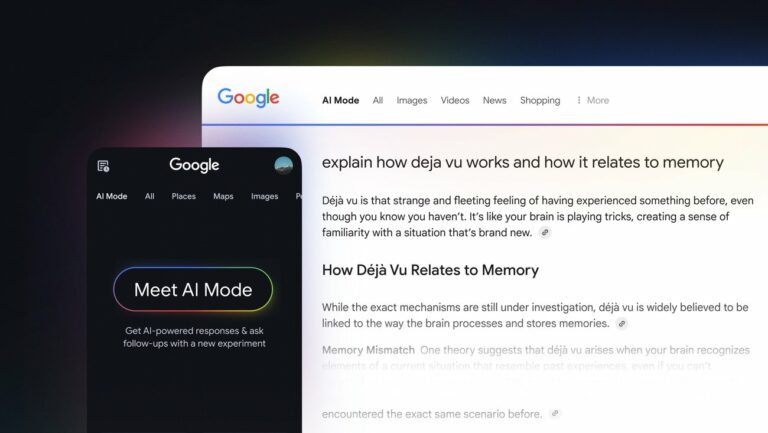
Under the bonnet, Google AI Mode combines specialised AI components, so your query feels less like a keyword search and more like a conversation with a powerful research assistant.
- Gemini 2.5 language coretrained on extensive volumes of text, it understands nuance, technical terms and colloquial phrases alike.
- Index acceleratoraccesses Google’s huge index directly instead of searching pages sequentially, and finds relevant passages in milliseconds.
- Context processing engineuses your search history, location and preferences so that answers are tuned to what matters to you.
- Multimodal processorrecognises text and objects in images, processes speech and image together and delivers results without losing information.
By orchestrating these modules in parallel, AI Mode turns a simple query into a rich, multi-layered research session, with no manual look-up.
Rollout plan and availability
- 5 March 2025internal launch in AI Labs.
- 20 May 2025start of the US rollout.
- 27 June 2025available to all desktop users in the US.
- End of 2025expected global expansion into major English-speaking markets.
Usage has spread steadily. In the first two months, the share of AI Mode sessions rose from 0.25% to over 1% of desktop searches in the US, a fourfold increase in under eight weeks. (Semrush)
How does Google AI Mode work in detail?
Google AI Mode turns a simple search into a multi-layered research session by interpreting your input, enriching it with personal signals and running dozens of micro queries in parallel.
It then classifies and summarises the results and merges them into a seamless answer, all within a single interface.
1. Query input (multimodal)
You start AI Mode by typing, speaking or even taking a photo. The system immediately converts your words, voice waveform or image pixels into a unified query.
That means you can ask “What kind of plant is this?” and upload a picture of a leaf, or dictate “Show me the best Italian restaurants nearby”, and AI Mode treats both as equivalent queries.
2. Context enrichment
AI Mode then adds signals such as your location, device type and recent searches.
It knows that you searched for “budget laptops” yesterday and marked the airport in your maps app this morning, so the results are tuned to your travel needs, price preferences and time zone.
3. Initial interpretation
Now Gemini 2.5 analyses your main intent. Is this about a set of instructions, a product comparison or a quick fact check? By categorising your goal up front, comparing camera specifications versus booking a flight, it chooses the best route for processing and presenting the answer.
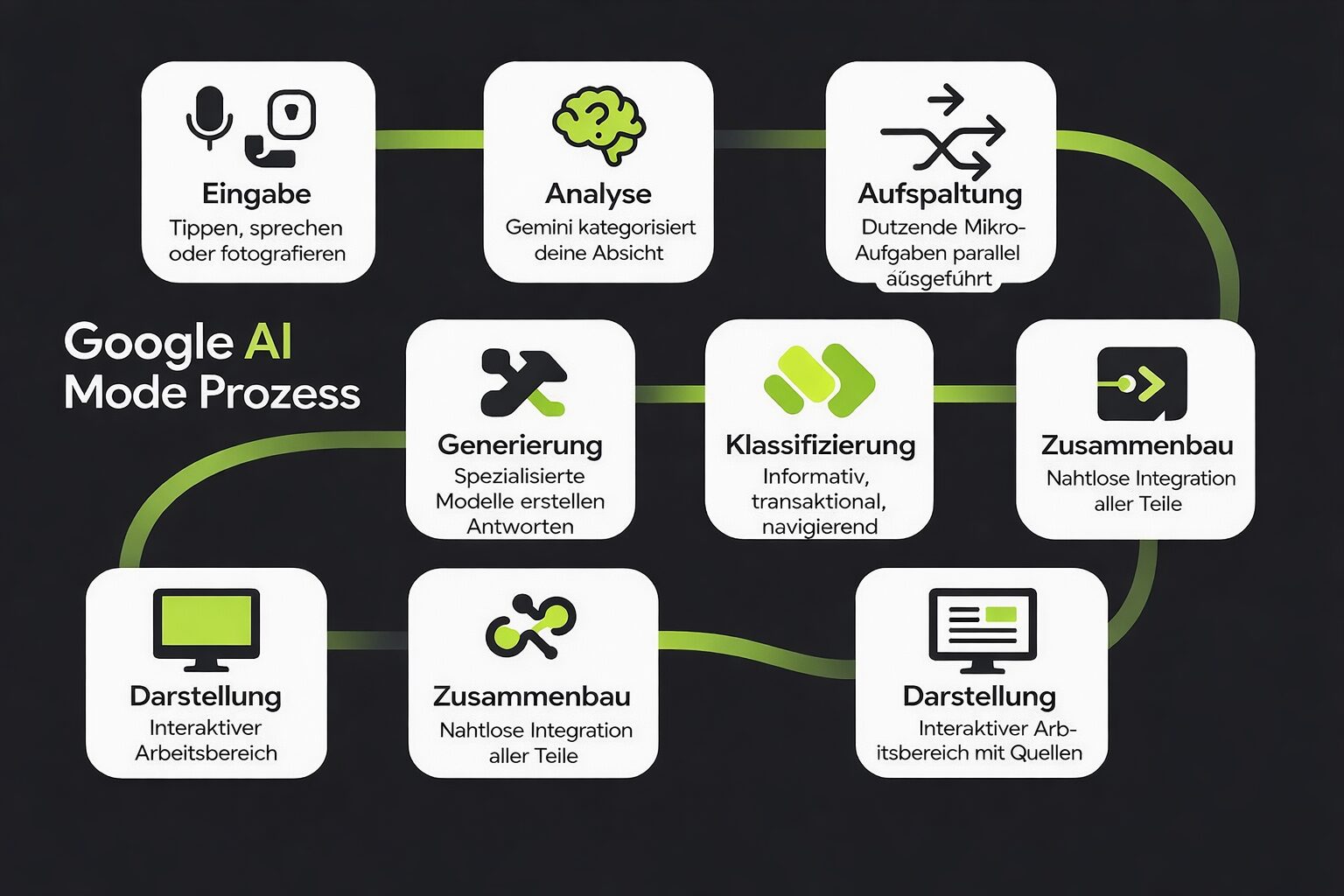
4. Parallel query generation (fan-out)
Instead of treating your question as a single search query, AI Mode runs dozens of micro queries in parallel. For example, it asks “What are the technical specifications?”, “Where are the lowest prices?” and “Which retailers are nearby?” at the same time.
This cuts latency drastically and makes sure no relevant aspect is overlooked.
5. Document retrieval
Every micro query accesses Google’s index directly. In milliseconds the system pulls top passages, tables and charts for each sub-question.
You do not have to wait for a single crawl to finish, you collect concentrated insights from the web in real time.
6. Query classification
With all this raw data, a dedicated classifier tags every answer by type: informational, transactional or navigational.
That way the three-line product summary does not get mixed up with “buy now” links, and every part plays its role in the final output.
7. Answer generation
Specialised models now take over. Some shorten and summarise long reports, others extract precise figures or generate step-by-step instructions.
They weave prose, bullet points and visuals into a coherent narrative instead of simply stringing facts together.
8. Answer assembly
As soon as each partial answer has been created, the system merges them into one flowing overall answer. You get an integrated answer instead of a list of individual answers.
Transitions are smoothed, redundancies are eliminated and the most important findings are highlighted prominently.
9. Presentation in the UI
Finally, AI Mode displays the result in an interactive sidebar or a tab. You see the summary at the top, source cards for further reading and suggested follow-up queries, without loading any additional pages.
The result is a research workspace of its own, right next to your regular search results.
Chapter summary
- Your input may be typed, spoken or photographed, and AI Mode turns it into a unified query.
- Location, device type and recent searches enrich the query before Gemini 2.5 determines the main intent.
- Instead of one search query, dozens of micro queries run in parallel against Google’s index. That is the query fan-out.
- A classifier sorts the raw data into informational, transactional and navigational, and specialised models write the partial answers from it.
- At the end the parts merge into one overall answer that appears in an interface of its own, with source cards and follow-up queries.
How does Google AI Mode differ from AI Overviews?
AI Mode and AI Overviews both use Google’s generative AI, but they serve different purposes. AI Mode is a conversational, research-oriented layer. AI Overviews are concise summaries at the top of the standard SERPs.
| Aspect | AI Mode | AI Overviews |
|---|---|---|
| Position in the interface | Its own “AI Mode” tab or sidebar | At the top of the main search results |
| Depth of analysis | Multi-stage, parallelised sub-queries | Simple overview |
| Interaction style | Conversational, allows follow-up queries | Static text snippet |
| Citation density | 5 to 7 source cards | 20+ inline citations |
| Stability of brand inclusion | Brands appear in 90% of answers | Brands are mentioned in 43% of overviews |
AI Mode is a research workspace of its own, with few but deep sources. AI Overviews stay the short summary with many inline citations above the blue links.
Brands get more reliable presence in AI Mode, in 90% of answers, compared with the volatile AI Overviews. (Search Engine Land)
In which areas can Google AI Mode be compared with ChatGPT?
ChatGPT and Google AI Mode both let you chat with AI, but they do different jobs. In March 2025, ChatGPT recorded 535.9 million unique visitors, a 45% increase over the year, but it uses a static knowledge base. (Semrush)
AI Mode, by contrast, already accounts for over 1% of desktop searches in the US following its launch in May. (Semrush)
| Aspect | ChatGPT | AI Mode |
|---|---|---|
| Orientation | Standalone chatbot | Integrated into Google Search |
| Data access and personalisation | No personal data | Uses Gmail, Maps and history |
| Functions and integration | Text, code and plugins | Search results, charts and image analysis |
| Multimodality | Text and images (DALL·E) | Text, speech and photos |
| Cost and performance | Subscription required | Free (with data sharing) |
The difference lies less in the model than in the access: ChatGPT works anonymously as an app of its own, while AI Mode sits inside search and may, with your permission, read your Google data.
Orientation
- ChatGPTis a standalone AI chatbot based on OpenAI’s GPT-4 model and optimised for creative writing, coding help and brainstorming.
- Google AI Modeis integrated directly into Google Search and turns queries into in-depth, context-driven answers without leaving the search page.
Data access and personalisation
- ChatGPTstarts every session with no built-in web access and no personal data, so every conversation is anonymous and neutral.
- AI Modecan draw on Gmail, Maps and your search history with your permission in order to tailor answers to your location, your preferences and earlier queries.
Functions and integration
- ChatGPToffers text generation, code snippets and plugin support for tasks such as data analysis.
- AI Moderuns right next to the standard search results and uses the Gemini 2.5 backend to merge web documents, charts and image analysis into one interactive view, with no app switching required.
Multimodality
- ChatGPTprocesses text and images (via DALL·E), but cannot process speech or live camera input directly.
- AI Modeaccepts text, speech and photos in a single query. Whether you take a photo of a product or dictate a question, the system handles both seamlessly.
Cost and performance
- ChatGPTcan require a subscription (Plus or Enterprise) for advanced features.
- AI Modeis free within Google Search, although the speed and depth of the answers depend on network conditions and your data permissions.
Chapter summary
- ChatGPT is a standalone chatbot, AI Mode is a layer inside Google Search.
- ChatGPT starts anonymous and neutral, AI Mode may draw on Gmail, Maps and your search history with your permission.
- ChatGPT processes text and images, AI Mode handles speech and photos in the same query as well.
- Advanced ChatGPT features cost a subscription, AI Mode is free in return for sharing data.
Free, no obligation
Where does your website actually stand?

We look at your rankings, your technical setup and your visibility in AI answers, then tell you which lever moves the needle next.
Which core functions define Google AI Mode?
These four pillars turn every search into an all-in-one experience, with no more jumping between tabs or apps. You get in-depth research, hands-free task handling, intelligent suggestions and real-world insights, all from a single search interface.
1. Deep Search
Deep Search goes beyond simple snapshots by running dozens of sub-queries in parallel. Imagine researching a new market: instead of manually collecting statistics, case studies and trend reports one by one, AI Mode gives you a fully synthesised briefing within seconds.
- Time savedresearch that used to take hours is now done in minutes.
- Comprehensive contextcovers definitions, pros and cons and practical examples in a single view.
- Zero-click resolutionin over 92% of Deep Search sessions your question is answered without any external clicks being necessary. (Semrush)
2. Agent-like automation
See AI Mode as your digital support. Alongside answers, it can take on routine tasks autonomously.
That includes booking flights, writing personalised emails and arranging appointments by checking your calendar. This lets you concentrate on strategic work instead of administrative routines.
3. Adaptive recommendations
Because AI Mode draws on your search history and Google account context (with your consent), it does not just answer your question, it anticipates what you will need next.
It learns your preferred providers, frequently visited destinations and favourite formats and suggests follow-up queries that deepen your insights or speed up decisions.
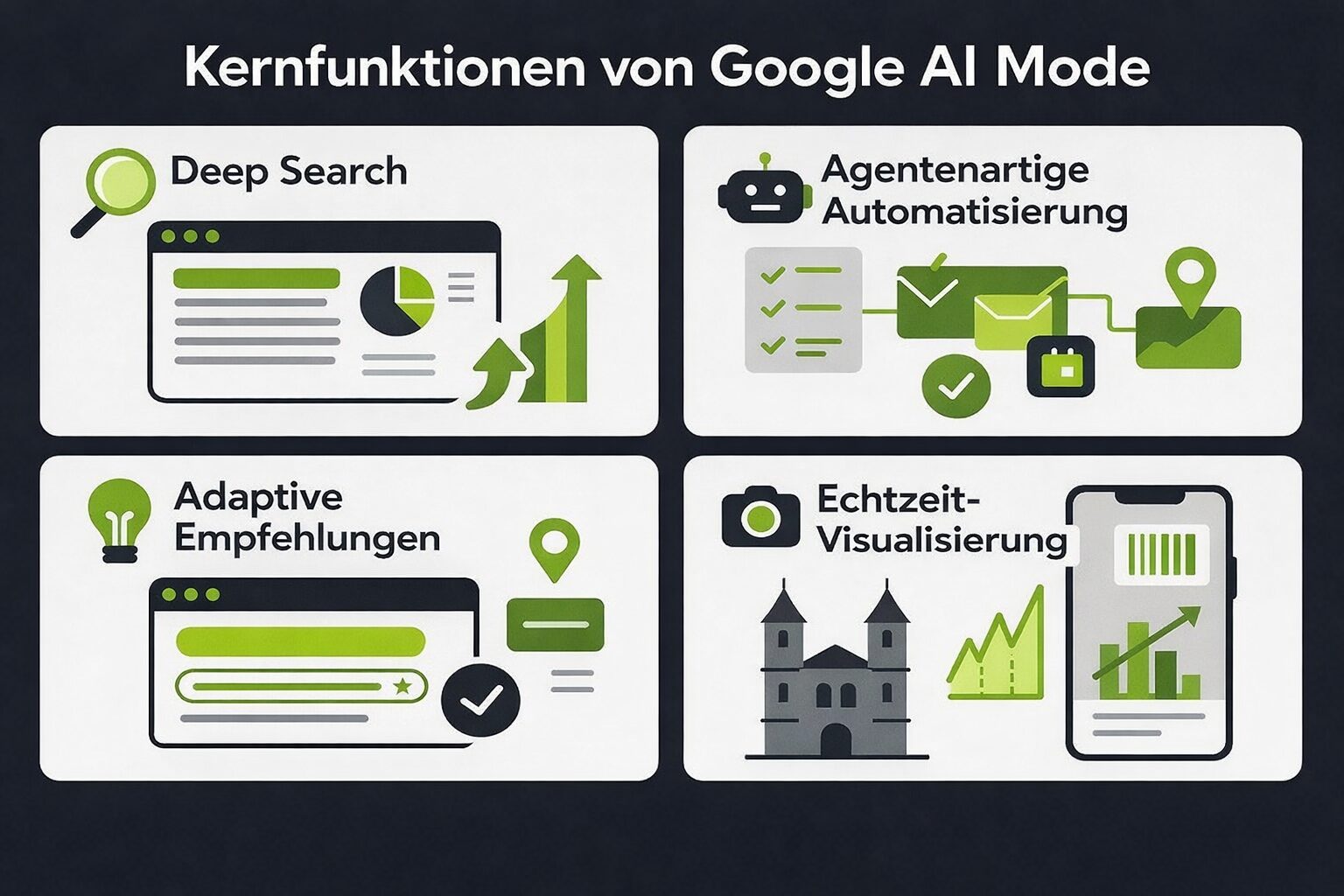
4. Real-time visualisation
Point your camera at a product label, a chart or a landmark, and AI Mode translates pixels into answers you can use immediately.
Image analysis recognises objects and text, dynamic charts turn figures into graphics and AR overlays highlight nutritional values or historical context.
That way every search merges with the real world.
Which practical applications can you use Google AI Mode for?
Whether you are analysing data, shopping online, looking for suppliers or simply clearing your inbox, AI Mode combines several tools into one seamless search experience.
1. Complex information gathering
If you are facing a mountain of research, specialist articles, industry reports or competitor analyses, Deep Search in AI Mode fires off dozens of sub-queries in parallel and condenses the results into a precise, fully cited briefing.
That is a game changer for anyone who has to stay up to date in fast-moving fields without constantly jumping between tabs. According to McKinsey, 78% of organisations already use AI in at least one business function, compared with 65% in the previous year.
| Research area | Example use |
|---|---|
| Specialist articles | Summarise the latest journal articles on sustainable materials. |
| Market analysis | Produce forecasts, key players and pricing trends in one go. |
| Technical problem solving | Generate step-by-step troubleshooting guides from expert forums. |
Three typical research cases that Deep Search covers in a single pass, instead of in a dozen separate searches.
2. E-commerce discovery
AI Mode turns product research into a single search session. Instead of juggling tabs for specifications, price comparisons and user reviews, it brings everything together in one place.
For example, ask: “Find me a 4K monitor under $300 with a refresh rate of at least 144 Hz.” AI Mode immediately delivers recommendations, price overviews and retailer ratings.
| Type of business | Benefits from AI Mode | Adjustments required |
|---|---|---|
| Online retailers | Higher conversion through precise product recommendations | Provide structured product data (Schema.org) |
| Brands | Highlight unique features directly with rich snippets | Ensure complete attribute lists |
| Marketplaces | Lower bounce rates through AI-guided navigation | Integrate APIs for real-time stock levels |
Anyone who wants to show up in AI Mode has to deliver their own product data in machine-readable form: Schema.org, complete attributes and current stock levels.
65% of companies report better SEO results thanks to AI tools, proof that data-driven product pages pay off. (Semrush)
3. B2B market analysis
For procurement teams and strategy leads, AI Mode can instantly generate industry overviews, supplier shortlists and compliance checklists.
For example, ask: “Who are the top 5 solar panel manufacturers in Europe with ISO 9001 certification?” and receive a curated list with company profiles and key figures within seconds. This speeds up decisions and keeps you agile in competitive markets.
85% of B2B marketers believe that AI will have positive effects on marketing and sales in the coming year. (Semrush)
4. Everyday automation
Beyond research and shopping, AI Mode acts as a productivity assistant. Need an email template for a job application? Ask AI Mode and you get a template in a fitting style.
Want to turn today’s top news into a to-do list? No problem. From translating documents to creating project overviews, AI Mode handles it all without switching context between apps.
According to one survey, 57% of small businesses use AI to automate recurring tasks and save time. (radixweb.com)
Chapter summary
- Research: Deep Search bundles specialist articles, market analysis and technical problem solving into one cited briefing.
- E-commerce: specifications, prices and reviews land in a single search session, provided the product data is structured.
- B2B: industry overviews, supplier shortlists and compliance checklists appear within seconds.
- Everyday life: email templates, to-do lists and translations run without switching context between apps.
Which business benefits and limitations should you keep in mind?
AI Mode can speed up your workflows and increase brand visibility, but it also brings new challenges in measurement, governance and SEO strategy.
Early adopters report clear efficiency gains: SMEs using Microsoft 365 Copilot (a similar generative AI assistant) achieved an ROI of 132% to 353% over three years. (Microsoft)
What AI Mode delivers for businesses
- Speed of insightcomplex queries are resolved in a fraction of the time because AI Mode runs micro queries in parallel.
- Deeper contextual answersby taking your history and preferences into account, the answers deliver more than surface-level snippets.
- Stable brand presenceunlike fleeting organic listings, brands appear in over 90% of AI Mode answers, which provides consistent visibility.
To make the most of these benefits, you have to adapt content structures, audit topical depth and track new metrics such as zero-click engagement, share of source citations and domain visibility instead of traditional ranking positions.
- Snippet readinesswrite clear, short answers at the top so AI Mode can extract and present them.
- Content completenessbuild out related subtopics to do justice to the fan-out approach.
- Zero-click monitoringmeasure how often your pages appear in AI Mode without an external click taking place.
Common mistake
Ethics and compliance are indispensable when you use personal data and generate automated recommendations. Regular audits help to avoid bias and misinformation.
- Bias reviewcheck AI answers regularly for biased language or under-represented perspectives.
- Data protection controlsmake sure consent covers every data source, including search history, Maps and Gmail.
- Transparency guidelinesdocument clearly how AI Mode uses personal signals to generate the answers.
AI Mode is dynamic: one study shows that with repeated queries the results change in 91% of cases, so fixed rankings are no longer enough.
Source: Search Engine Journal
What matters for monitoring
- Dynamic monitoringtrack domain-wide citation rates instead of individual URL positions.
- Content update rhythmupdate important pages more frequently to capture shifting AI Mode sources.
- Source diversitysecure backlinks and structured data on several trustworthy domains to increase your citation presence.
Frequently asked questions
What is Google AI Mode?
Google AI Mode is Google’s generative AI layer, integrated directly into the search interface. Instead of returning links only, AI Mode analyses your query, divides it into sub-questions and produces an answer that is richer than a standard snippet, including charts, source cards and follow-up prompts.
How does AI Mode differ from AI Overviews?
AI Mode is a conversational, research-oriented layer with its own tab or sidebar, multi-stage sub-queries and 5 to 7 source cards. AI Overviews are concise summaries at the top of the standard SERPs with 20+ inline citations. Brands appear in 90% of AI Mode answers, but in only 43% of overviews.
What does query fan-out mean?
Instead of treating your question as a single search query, AI Mode runs dozens of micro queries in parallel, asking about technical specifications, the lowest prices and nearby retailers at the same time. This cuts latency drastically and makes sure no relevant aspect is overlooked.
How long has Google AI Mode been available?
The internal launch in AI Labs took place on 5 March 2025 and the US rollout started on 20 May 2025. Since 27 June 2025 AI Mode has been available to all desktop users in the US, and expansion into major English-speaking markets was expected for the end of 2025.
Is Google AI Mode free?
Yes, AI Mode is free within Google Search, although you share data in return. The speed and depth of the answers depend on network conditions and your data permissions. ChatGPT, by contrast, can require a subscription for advanced features.
What does AI Mode mean for my SEO strategy?
Write clear, short answers at the top so AI Mode can extract them, build out related subtopics for the fan-out approach and measure how often your pages appear in AI Mode without an external click. Because the results change in 91% of cases with repeated queries, domain-wide citation rates count for more than individual URL positions.
Ready for more revenue?
Book your SEO & GEO audit
Find out in a free call how much revenue your website is leaving on the table, with no obligation and no agency waffle.