


Everything at a glance
- A relaunch is not a restart: you are upgrading a live asset, so preserve the value first, then improve.
- 301s are the heart of continuity: map them one to one by intent; never redirect to the home page.
- Mobile and performance run the show in 2025: mobile traffic is the majority, and WordPress Core Web Vitals pass rates are still low, so speed work pays off.
- Plan, test, monitor: protect your winners, validate before launch, then watch Search Console and logs for 8 to 12 weeks.
- Google is the main arena: with around 93.8 % of mobile search share, fix things for Google first (then for everyone else).
You are planning to overhaul an existing site, with a new layout, a tidier structure, faster code and stronger UX, but you do not want rankings to collapse. This guide gives you a clear, step-by-step route to carry out a website relaunch without losing the value you have already earned. It relies on practical workflows rather than theory and reflects how we deliver SEO-safe relaunches for clients: preserve what works, repair what is broken, and change only what measurably improves UX, performance or conversions (ideally all three).
What is a website relaunch, and when does it make sense for you?
A website relaunch updates an existing site. You are not starting from zero; you carry authority, rankings and backlinks forward and improve design, structure, content and technology. That difference matters, because every change that breaks continuity can cost you visibility. When nobody wants to own redirects and indexing, SEO relaunch support covers exactly that gap.
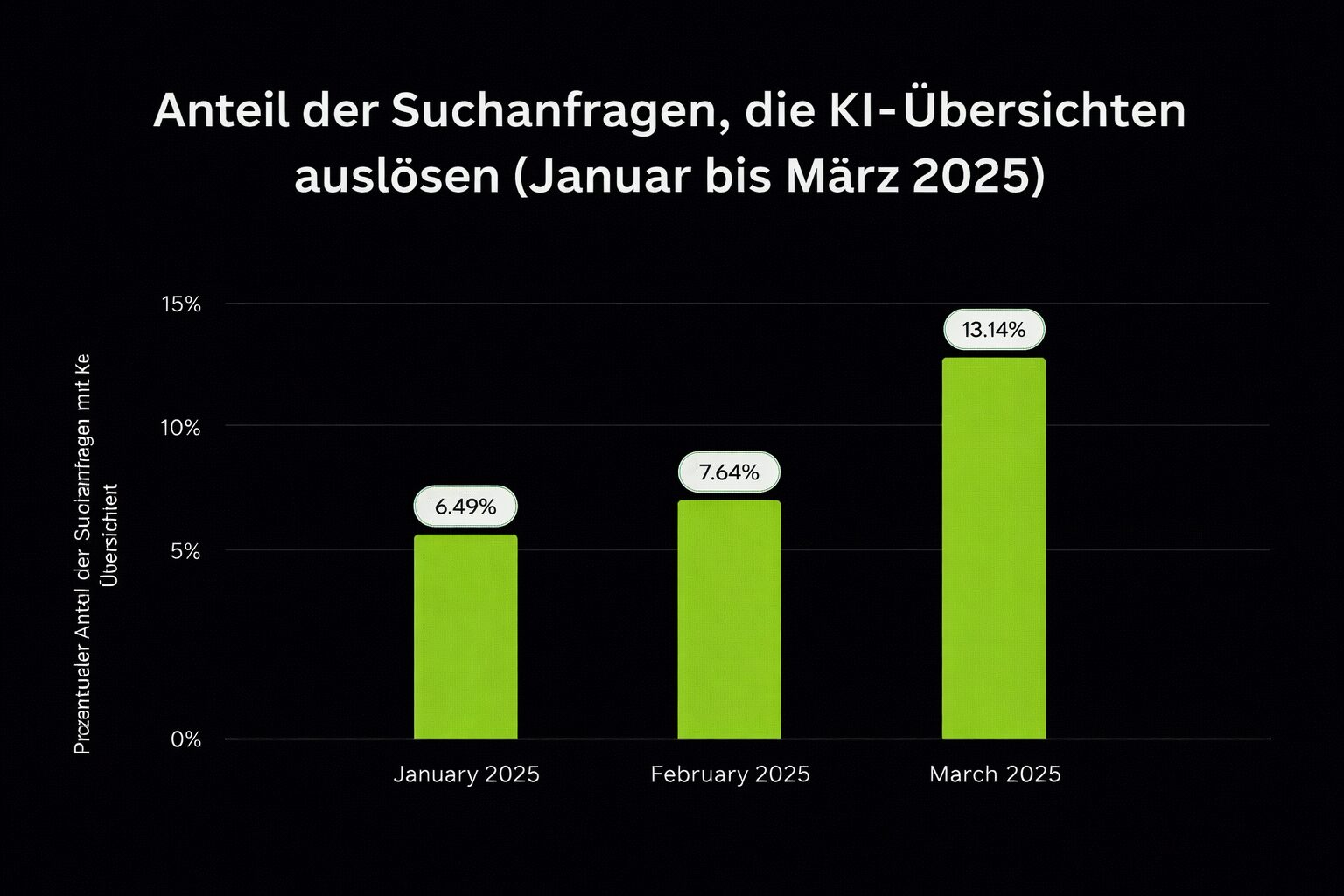
Google’s AI Overviews appear in more than 13 % of searches (July 2025), which changes click behaviour and raises the bar for usefulness and trust. Relaunch plans should take that into account: structured content and clear answers win. Semrush
Relaunch vs launch, explained simply
- RelaunchYou upgrade a live site, with a new design, navigation, templates, performance or even CMS, while preserving SEO value.
- LaunchYou publish a completely new site with no prior equity.
Leading how-to resources stress this difference and treat a relaunch as a continuity project: keep what works (URLs, intent, internal links), change what helps (UX, speed, content quality), and minimise risk with careful testing and redirects.
| Dimension | Relaunch | Launch |
|---|---|---|
| What it is | An overhaul of an existing live website. | The publication of a completely new website. |
| Starting point | Already has history: URLs, rankings, backlinks, users. | No existing authority or visit patterns. |
| SEO value | Preserve and build on what already works. | Start at zero; SEO value has to develop over time. |
| Main goal | Continuity: keep what works; improve UX, speed and content. | Get from nothing to a usable and scalable website. |
| Typical changes | Design, navigation, templates, performance, CMS. | A complete website build: information architecture, content, design, tech stack. |
| Risk profile | Higher SEO risk if mistakes are made (lost URLs and links). | Lower legacy risk, but a slower start. |
| Key tactics | Careful testing, one-to-one redirects, preserving search intent and internal links. | Clean information architecture, high-quality content, a technical foundation, indexing. |
| Success signals | Stable or improved rankings, a faster website, better UX. | First indexing, first traffic and keyword growth. |
With a relaunch you start with credit, with a launch you start at zero – and that is where the different risks and tactics come from.
Which types of relaunch are there, and why do they matter?
“Relaunch” covers several types of change, each with its own SEO risk profile: a design or UI refresh, a technical rebuild, a content migration, a domain move or a CMS/platform switch. Treat them differently and test consistently.
Mobile now accounts for around 59 % of global web traffic (July 2025). Any relaunch that forgets mobile speed and UX is asking for trouble. StatCounter Global Stats
Design relaunch vs technical relaunch
- Design/UI relaunchNew navigation, components or layout. Pay attention to internal linking (menu depth, footer links), on-page semantics (H1 to H3) and above-the-fold elements that influence LCP.
- Technical relaunchNew architecture (for example SSR/SSG), hosting, build pipeline or rendering path. Validate crawlability (robots, rendering), XML sitemaps, canonicals, hreflang and Core Web Vitals on real templates, not just the home page. Evergreen’s checklist breaks these tasks down into manageable steps.
| Dimension | Design/UI relaunch | Technical relaunch |
|---|---|---|
| What changes | Navigation, components, layout, on-page structure. | Architecture (SSR/SSG), hosting, build pipeline, rendering. |
| SEO focus | Internal linking (menu depth, footer), H1 to H3 semantics, above the fold for LCP. | Crawlability (robots and rendering), XML sitemaps, canonicals, hreflang. |
| Validation | Template checks for headings, links and CLS/LCP targets. | Core Web Vitals on real templates (not just the home page); server and client rendering tests. |
| Common risks | Hidden links, deeper menus, broken semantics damaging relevance. | Blocked crawling, wrong canonicals, missing sitemaps, regressions in vitals. |
Design/UI relaunch vs technical relaunch
Content migration and restructuring
- Run a content audit first: what ranks, what converts, what has backlinks, and what should be merged or retired.
- Create a keyword and URL map that assigns every intent to a target page on the new site. Your redirect plan should come out of that, not the other way round. Solid guides stress mapping before you touch staging.
| Dimension | Migration | Restructuring |
|---|---|---|
| Goal | Move proven content without losing value. | Re-map content to search intent and information architecture. |
| First step | Content audit: what ranks, converts and has backlinks; what to keep, merge or delete. | A keyword and URL map that assigns a target page to every intent. |
| Redirects | Set up one-to-one redirects for changed or removed URLs. | The redirect plan follows from the map (never the other way round). |
| Core tasks | Keep slugs where possible; carry over titles and meta data; migrate media. | Merge thin or overlapping pages; adjust internal links; improve content quality. |
| Risks | Loss of meta data and links, missing assets, redirect loops. | Cannibalisation, orphaned pages, the wrong intent. |
Content migration vs content restructuring
Domain moves or CMS switches
- Domain moveThe highest risk. Do not proceed without one-to-one redirects and a documented change of address in Google Search Console.
- CMS or platform switchTry to carry over the old URL structure as closely as possible. If you have to change URLs, do it with semantic continuity, not onto generic catch-all pages. SISTRIX puts it plainly: never start a relaunch without redirects.
| Dimension | Domain move | CMS/platform switch |
|---|---|---|
| Risk level | The highest SEO risk. | Moderate risk if URLs are preserved. |
| Must-haves | One-to-one redirects; submit a change of address in Google Search Console. | Replicate the old URL structure as far as possible; keep slugs and parameters. |
| If URLs change | Map old to new exactly; check all critical paths. | Ensure semantic continuity; never redirect to generic pages. |
| Monitoring | Watch crawl errors, indexing and rankings after the move. | Validate crawlability, canonicals, sitemaps and templates before go-live. |
| Rule of thumb | Never carry out a relaunch without redirects. | Never carry out a relaunch without redirects. |
Domain move vs CMS/platform switch
What are the success factors for a successful website relaunch?
Three levers decide the outcome: UX consistency, SEO continuity and technical diligence. Tackle them with one integrated plan, not in isolated silos.
Only around 43.4 % of WordPress sites currently pass Core Web Vitals (June 2025). That makes performance a competitive advantage you cannot skip during a relaunch. Search Engine Journal
UX and design consistency
- Keep navigation simple and predictable. Do not hide important categories behind “mystery meat” menus or gimmicks.
- Preserve the information scent: the words users expect to click should still be clickable, in roughly the same places.
- Align the semantics of components (headings, lists, tables) so that search engines understand the layout the same way users do. Evergreen’s relaunch playbook stresses these guard rails in design and content.
SEO continuity and performance
- Protect top landing pages: pages with rankings, backlinks or revenue have to keep their intent, internal links and crawl paths.
- Strengthen internal linking so that important pages remain hubs in the graph.
- Secure Core Web Vitals with strict budgets for media sizes, fonts and JavaScript per template. Performance gains are particularly stable after a relaunch.
Clean technical implementation and testing
- Use a password-protected staging environment set to noindex. Never test on production.
- Before go-live, crawl the old and new sites, validate status codes, check for redirect chains, verify sitemaps, robots, canonicals and hreflang, and fix anything that could block crawling or indexing.
- After go-live, keep Search Console, logs, rankings and analytics in focus (see the checklist below). These are common best practices in respected German-language relaunch guides.
Chapter summary
- UX consistency means predictable navigation, a preserved information scent and stable component semantics.
- SEO continuity means protecting top landing pages with their intent, internal links and crawl paths, and strengthening internal linking.
- Technical diligence means password-protected staging set to noindex, crawl and status-code checks before go-live, and monitoring afterwards.
- Performance is not a side issue: only around 43.4 % of WordPress sites pass Core Web Vitals, so there is a real competitive advantage here.
How do you plan and carry out a relaunch step by step? (SEO checklist)
Work in five phases: inventory, SEO plan, basics, 301s, monitoring. Each phase has concrete tasks and a “definition of done” you can tick off.
Results in position 1 bring an average click-through rate of around 39.8 %, so even small losses after a relaunch can hit traffic hard. Protect your number one positions. (First Page Sage)
| Google search result | CTR |
|---|---|
| Ad position 1 | 2.1% |
| Ad position 2 | 1.4% |
| Ad position 3 | 1.3% |
| Ad position 4 | 1.1% |
| Organic position 1 | 39.8%* |
| Organic position 2 | 18.7%** |
| Organic position 3 | 10.2% |
| Organic position 4 | 7.2% |
| Organic position 5 | 5.1% |
| Organic position 6 | 4.4% |
| Organic position 7 | 3.0% |
| Organic position 8 | 2.1% |
| Organic position 9 | 1.9% |
| Organic position 10 (where present) | 1.6% |
Around 30 percentage points of click-through rate separate position 1 from position 3 – which is why every top position lost in a relaunch is expensive.
Step 1: take stock and analyse your current SEO performance
- Export everything now: Search Console (queries, pages), analytics (revenue and landing pages), top backlinks, current crawls.
- Create a complete URL inventory with status, canonicals, traffic and link level.
- Mark the priority pages that must not lose their intent or their internal links.
Step 2: plan your SEO strategy for the new website
- Create a keyword and topic map that assigns exactly one main intent per URL.
- Finalise information architecture and navigation: reduce click depth, add breadcrumbs, and index filters or facets only when they provide unique value.
- Define template content patterns (meta data, H1, introduction, modules, FAQs, internal links) for categories, services, hubs and articles. The Evergreen checklist offers a reliable order of work.
Step 3: make sure all SEO basics are covered
- Meta data, heading structure, schema (FAQ/HowTo), image SEO (formats, alt text) and canonicals are in place.
- Index control: robots.txt, noindex for staging and clean XML sitemaps per type.
- Performance budgets per template in order to meet Core Web Vitals.
Step 4: implement redirects correctly (301s above all)
- Map old to new one to one by intent and semantics.
- No blanket redirects to the home page. Avoid chains and test the list with a crawler before go-live.
- This is failure point number one, and the long-standing warning from SISTRIX remains the simplest rule of thumb: do not start a relaunch without redirects. SISTRIX SISTRIX
Step 5: monitor rankings and traffic before, during and after the relaunch
- Beforehand
Secure your benchmarks (rankings, clicks and impressions, conversions).
- On go-live day
Run a live crawl for 404s, 500s and redirect loops; resubmit sitemaps; set the Search Console change of address if the domain has changed.
- Weeks 1 to 12
Watch Search Console coverage, server logs (crawl budget, spikes in 404s) and ranking changes; counteract in a targeted way with redirects and internal links. The relaunch guide from More-fire gives this monitoring phase a realistic shape.
Summary: the key to a stress-free and SEO-safe relaunch
Plan early, protect your winning pages, implement clean 301s, prioritise performance over “pretty” and keep monitoring tight after launch. These five habits prevent 90 % of relaunch regret. Evergreen and SISTRIX stress this for good reason.
Free, no obligation
Where does your website actually stand?

We look at your rankings, your technical setup and your visibility in AI answers, then tell you which lever moves the needle next.
What are the 10 most important measures for a successful website relaunch?
Relaunches rarely just work by themselves. They work because you treat them like a house move: you say where you have moved to, you leave signposts behind, and you double-check that deliveries still arrive. Same energy here, except that the “people” are users and crawlers and the “deliveries” are traffic, leads and sales.
Google holds around 93.8 % of mobile search share worldwide (July 2025), so Search Console, crawling and index coverage in Google are the main battlefield after launch.
Source: StatCounter Global Stats
Below you will find a proven checklist in the same plain-language style we use with clients. Simple on paper; the craft lies in the execution.
1) Keep the URL structure, or redirect it correctly
Your URLs are like street addresses. Keep them if you can. If you cannot, move with a redirect plan.
- Keep slugs and paths wherever possible.
- If changes are unavoidable, map old to new one to one by search intent and topical relevance.
- Use 301 (permanent) redirects, not 302 or 307, for the final hop.
- Never send retired pages to the home page in bulk. That confuses users and wastes link equity.
Pitfalls to avoid
- Redirect chains and loops (old, then an intermediate target, then the new page). Keep it to one hop.
- Redirecting to topically unrelated pages “just to catch it”. Better: create a relevant successor page.
Keep addresses stable; if you have to move, redirect precisely.
2) Identify and preserve important landing pages
Some pages carry your visibility and your revenue. They deserve special treatment. Here is how to find them.
- Traffic and conversionsYour most important organic entry points and revenue pages.
- RankingsThe queries where you consistently win.
- LinksURLs with high-quality backlinks.
- Business impactSales, leads, bookings, whatever matters most.
Protect them
- Preserve their topical focus, the URL where possible, and the on-page signals (H1s, introductory context).
- Maintain their crawl paths and internal links from menus, hubs and high-traffic posts.
- Raise the quality: update outdated sections, add missing FAQs, charts and examples.
Do not reinvent proven performers, refine them.
3) Check external backlinks and update them where possible
Redirects are a safety net; a direct link is a trampoline.
Do this
- Export your top referring pages and link-heavy assets (media mentions, guides, PDFs).
- After go-live, spot-check whether they resolve to the intended new pages.
- Where you have relationships, ask for link updates to the final URLs, especially for your most heavily linked assets.
Updating a handful of high-quality links can pay back the entire relaunch.
4) Reinstall and verify tracking and analytics
Day-one data is gold, so do not start the new chapter blind.
Essentials
- Consent layer active and tested.
- Analytics (GA4 or Matomo) installed via a tag manager, not as hard-coded fragments scattered everywhere.
- Events: scroll depth, CTA clicks, form submissions, e-commerce events.
- Cross-domain or subdomain tracking, where applicable.
How to test
- Validate on staging first (with your IP excluded), then again on production after the DNS cutover.
- Compare pageview counts, event fires and attribution against your pre-launch baselines.
If you do not measure it, you cannot fix it quickly.
5) Never test or change the site directly in the live version
Common mistake
“Let’s just push it and see” is how rankings disappear.
A safe workflow
- Build on staging with password protection and noindex.
- Run SEO checks (metadata, headings, canonicals, hreflang, schema, sitemaps, robots) before the merge.
- Only ship after QA and SEO sign-off, and retest critical paths after the deploy.
Staging is cheap insurance against public mistakes.
6) Coordinate Google Ads with new URLs or structures
Paid and organic share the same shop window. Keep ads in sync so that you do not pay for dead ends.
Update immediately
- Final URLs, sitelinks, callouts, images and all URL-based ad assets.
- Feeds (Shopping and PMax), audiences and conversion goals.
- Recheck landing page speed, mobile UX and message match to protect your Quality Score.
Align the address book for paid traffic on day zero.
7) Expand content where it is needed, and do not cut valuable copy
Relaunches often prettify pages and accidentally remove the very thing that earned them rankings.
Do this
- Consolidate thin, overlapping pages into one stronger canonical page.
- Update outdated sections with current data, a clearer structure and visuals.
- Preserve the unique angles, examples and FAQs that earn links and satisfy intent.
Do not do this
- Cutting successful pages across the board to fit a new design.
- Deleting old assets that attract links without providing a successor.
Trim selectively; expand the winners.
8) Preserve or improve your internal linking structure
Internal links are the pipes that carry authority through your website. Do not wreck the plumbing.
Priorities
- Keep strong hub pages visible in navigation, breadcrumbs and body links.
- Use descriptive anchor text that matches search intent.
- Fix orphaned pages created by new templates or filters.
- Add links from top-traffic posts back to priority money pages.
The pages that are meant to rank have to be the easiest to reach.
9) Create a helpful custom 404 page before go-live
People will hit missing URLs. Offer orientation instead of a dead end.
What it should contain
- A clear message, a site search, top categories and popular links.
- A quick route to contact or support if users get stuck.
- Track 404 hits and set alerts so that you can add missing redirects quickly.
A smart 404 turns errors into second chances.
10) Watch Search Console and server logs closely after the relaunch
The first few weeks tell you everything. Here is what to watch in Google Search Console.
- CoverageSubmitted vs indexed, soft 404s, canonical conflicts.
- SitemapsStatus and discovered URLs.
- Crawl statsRises or drops in fetches.
- EnhancementsSchema errors, mobile usability.
What to look for in the logs
- Spikes in 404s (missed redirects).
- Bot traps or endless parameter crawls that waste budget.
- Unexpected user-agent behaviour after CDN or WAF changes.
Fix small problems quickly so that they do not become big ones.
Extra for planners: timing, common mistakes and a copy-paste checklist
Timing that lowers risk
- Avoid your peak season and big campaign days.
- Go live mid-week, during business hours, with all stakeholders reachable.
- Allow 8 to 12 weeks for continuous monitoring and iterative fixes. The Evergreen playbook supports a staged rollout of this kind.
Common mistakes to avoid
- Testing on production; staging not set to noindex.
- Using 302 or 307 instead of 301; building redirect chains.
- Blanket redirects to the home page; missing XML sitemaps or broken canonicals.
- Optimising only the home page while template pages fail Core Web Vitals. SISTRIX and Evergreen point to these pitfalls repeatedly.
A mini checklist to paste into your project management tool
Before go-live
- Old-to-new URL map (CSV) finished; redirects tested with a crawler
- Priority pages marked (traffic, revenue, backlinks)
- Meta data, headings, schema, image SEO and internal links verified
- Core Web Vitals tested on real content templates (not just the home page)
- Staging password-protected and set to noindex, no public test links
On go-live day
- Live crawl (status codes, chains, 404s and 500s)
- XML sitemaps resubmitted; Search Console change of address for a domain move
- Consent and analytics verified (events, e-commerce)
Weeks 1 to 12
- Watch Search Console coverage, errors and manual actions
- Check server logs for spikes in 404s and crawl waste
- Track ranking changes; reinforce in a targeted way with internal links and additional redirects.
Chapter summary
- Keep URLs, or redirect them one to one with 301s, never in bulk to the home page and never in chains.
- Identify important landing pages beforehand and protect their topical focus, URL, on-page signals and crawl paths.
- Backlinks, Google Ads and tracking belong on the new URLs from day zero.
- Work only on staging, expand content instead of cutting it, preserve internal linking and provide a helpful 404 page.
- After go-live, watch Search Console, server logs and rankings for 8 to 12 weeks and steer accordingly.
Frequently asked questions
What is the difference between a relaunch and a launch?
A relaunch upgrades an existing live site, with a new design, navigation, templates, performance or even the CMS, while preserving SEO value. A launch publishes a completely new site with no prior equity and starts at zero.
Which redirects do I need for a relaunch?
301 (permanent) redirects, not 302 or 307. Map old to new one to one by search intent and topical relevance, avoid chains and loops, and test the list with a crawler before go-live. Blanket redirects to the home page confuse users and waste link equity.
Am I allowed to change my URLs during a relaunch?
Keep slugs and paths wherever possible. If changes are unavoidable, ensure semantic continuity and map every old address one to one onto a topically matching new page, not onto generic catch-all pages.
Which pages do I have to protect most during a relaunch?
Pages with a lot of organic traffic and conversions, pages with consistent rankings, URLs with high-quality backlinks and anything that directly brings sales, leads or bookings. They keep their topical focus, the URL where possible, their on-page signals and their internal links and crawl paths.
How long should I monitor after the relaunch?
Allow 8 to 12 weeks for continuous monitoring and iterative fixes. Watch Search Console coverage, sitemaps, crawl stats and enhancements, plus server logs for spikes in 404s and crawl waste, and the ranking changes.
Why is mobile so important during a relaunch?
Mobile accounts for around 59 % of global web traffic, and Google holds around 93.8 % of mobile search share. At the same time only around 43.4 % of WordPress sites pass Core Web Vitals, so mobile speed and UX are a real competitive advantage.
When should I go live?
Avoid your peak season and big campaign days. Go live mid-week, during business hours, with all stakeholders reachable, and test beforehand exclusively on a password-protected staging environment set to noindex.
Ready for more revenue?
Book your SEO & GEO audit
Find out in a free call how much revenue your website is leaving on the table, with no obligation and no agency waffle.