
Everything at a glance
- On-page optimisation turns a single page into an unambiguous answer, with clear search intent, fast load times and simple actions, so that rankings, clicks and conversions reinforce each other.
- Win the click with a clear H1 to H3 structure, targeted keyword placement, SEO-friendly URLs and honest, benefit-led titles and meta descriptions.
- Serve the intent with helpful content and your own media; steer journeys with descriptive internal anchors and eliminate orphan pages.
- Secure the technical basis: crawlability, indexability, structured data, mobile-first design, Core Web Vitals and HTTPS increase visibility and trust.
- Make it a habit: audit regularly, fix cannibalisation, update content and test CTAs and snippets, especially on commercial pages, so that performance keeps climbing.
Your best customers are typing their questions into a search bar right now. The real question is whether your page shows up, and gets the click. On-page optimisation is the route to that moment. Not by gaming an algorithm, but by building a page that answers better, loads faster and is effortless to use.
Think of it as the art of making a page irresistible: clear intent, clean structure, precise keywords, compelling titles, trustworthy links and a layout that guides the eye towards action. Do this consistently and you do not just rank, you increase visibility, clicks and conversions across your entire website. To make that happen on every new page and not just at relaunch, SEO management keeps the checks running.
Whether you lead marketing, write content, run a shop or ship features, this guide is for you. We break on-page optimisation down step by step with practical examples you can apply today, with no jargon and no filler. The result: pages that win the snippet, hold readers and turn interest into leads or sales.
What is on-page optimisation (and why does it matter)?
Definition
On-page optimisation is the practice of improving a single page, its content, structure, metadata, internal links, speed and accessibility, so that search engines understand it and people prefer it. When every page answers the intent clearly, loads fast and guides visitors to the next step, rankings, clicks and conversions start to compound across your website.
Better visibility in search
On-page work makes topic and intent unmistakable: a clear H1 to H3 structure, a focused main keyword with natural variants, SEO-friendly URLs and internal links that signal relevance. It also helps you win the snippet with concise titles and descriptions that mirror the query.
Search is not “over”, it is evolving. BrightEdge reports that one year after Google’s AI Overviews, impressions rose by 49% and Discover CTR grew by 31% as brands adapted their content. That is your signal to keep optimising, not to slow down. (BrightEdge)
Improved user experience and engagement
Readers stay when the page feels effortless: scannable subheadings, short paragraphs, helpful visuals with descriptive alt text and clear next steps. Performance counts just as much: leaner JavaScript, compressed images and fast server responses reduce friction and build trust.
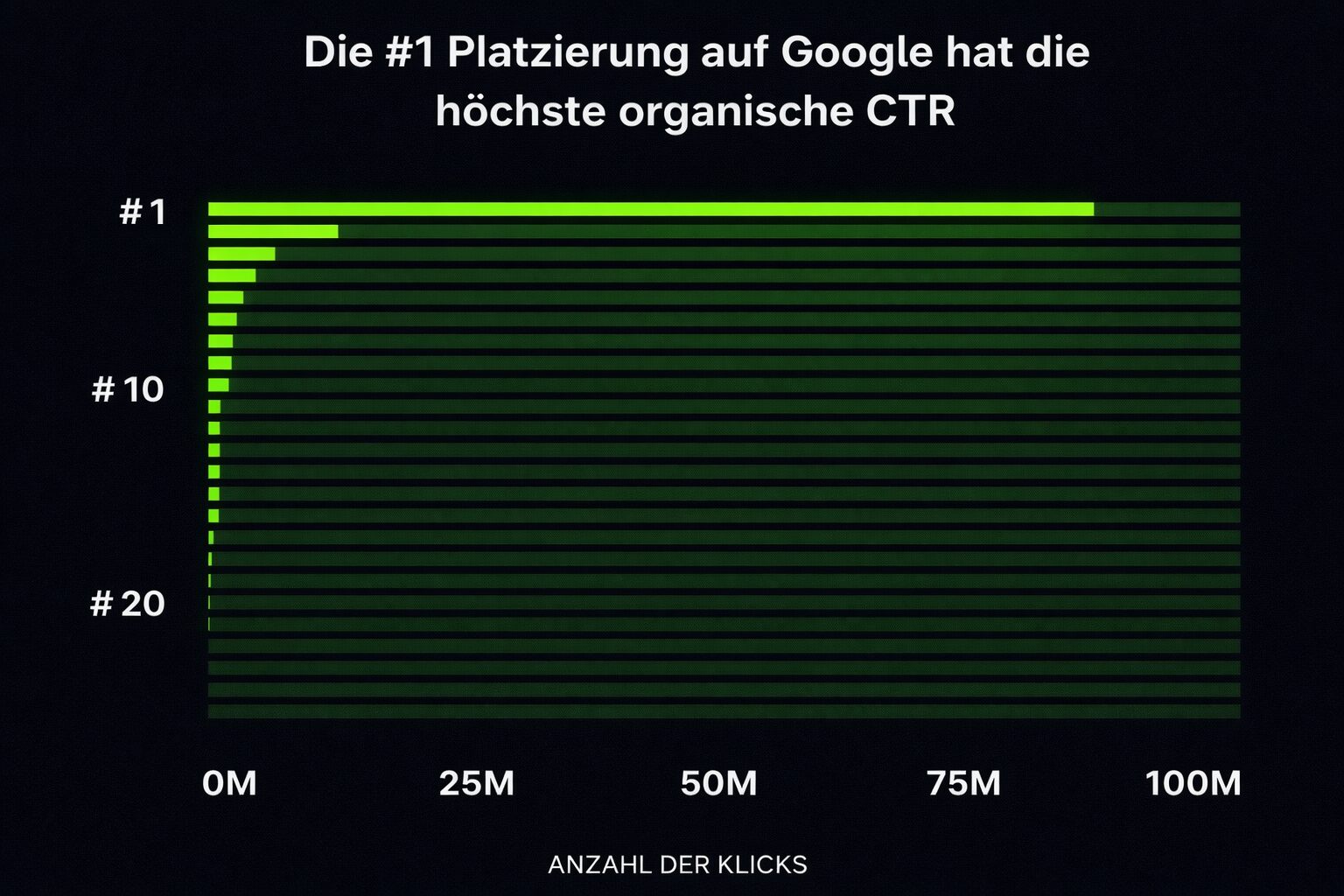
Backlinko’s 2025 study shows that the organic result in position 1 receives around 27.6% of clicks. Clarity, scannability and fast load times put you in the fight for those clicks (and for the dwell time that follows). (Backlinko)
Direct influence on rankings and conversions
Technical polish amplifies great content. Clean HTML, logical internal links and Core Web Vitals raise the ceiling; fewer layout shifts and faster interactions make forms more trustworthy and product pages easier to buy from.
A web.dev case study linked an 80% improvement in INP with 36% more conversions, a reminder that “UX” and “SEO” are two sides of the same coin. (web.dev)
The benefits at a glance
- Stronger visibility on topics that matter to your business
- A higher click-through rate thanks to precise, convincing snippets
- A better reading experience that increases time on the page
- Faster pages that lift trust and conversion rates
- Clearer internal paths that reduce orphan pages and distribute authority
- A repeatable, page-by-page process that adds up over time
What are the core elements of on-page optimisation?
Here is the playbook in plain English: match the search intent, place keywords deliberately, write genuinely helpful content, structure headings so the story is clear, polish titles and descriptions, keep URLs short and readable, and connect pages with smart internal links. Do this page by page and rankings usually follow.
Keyword placement and usage
Keywords are signposts for readers and search engines. Your aim is not to stuff them in, but to make the page’s purpose unmistakable. Lead with a clear topic, support it with natural variants, and let headings, body copy and links do the work. Stay human. Avoid clumsy repetition. Use related terms that people actually say.
Primary vs secondary keywords
Give each page a single primary topic and add 3 to 6 closely related phrases. Place them where they serve clarity, not where they disrupt the flow.
| Criterion | Primary keyword | Secondary / related keywords |
|---|---|---|
| Goal | Mark the page’s topic unambiguously | Deepen the topic and cover variants naturally |
| Number | 1 per page | 3 to 6 closely related |
| Best places | Title tag, meta description, H1, the first 100 to 150 words, one fitting H2/H3, URL slug, the first image alt text | Selected H2/H3, body copy, further image alt texts, internal anchor text |
| Note | Clarity before quantity; place it early | Vary naturally; do not force repetition |
Primary and secondary keywords in direct comparison.
Where the primary keyword should appear:
- Title tag (ideally well towards the front)
- Meta description (mirrors the promise in the title)
- H1 (matches the page’s core intent)
- The first 100 to 150 words (establishes context quickly)
- One relevant subheading (where it fits naturally)
- URL slug (short, readable, hyphenated)
- The alt text of the first image (descriptive, not stuffed)
Where secondary and related keywords fit best:
- Selected H2/H3 that introduce important sections
- Body copy, where the topic naturally calls for a variant
- Further alt texts (when the image really shows the concept)
- Internal anchor text pointing to supporting pages
Keep the reading experience fluid: if a keyword makes a sentence clumsy, rewrite it. Search intent > keyword count.
Keyword cannibalisation and how to avoid it
When two pages target the same intent, consolidate. Merge the overlapping content into the stronger URL, 301 the weaker one and realign internal links so that authority flows to a single, authoritative resource.
How to fix it in simple steps:
- Identify the overlap
Check Search Console, site: searches and your content map for pages with the same intent.
- Choose a winner
Keep the URL with the strongest equity (rankings, links, conversions) as the canonical source.
- Consolidate the content
Add the unique, valuable sections of the weaker page or pages to the winner, so that nothing useful is lost.
- Redirect sensibly
301 from the retired URL to the winning page in order to pass on signals and avoid soft duplicates.
- Realign links
Update internal links (menus, hubs, related posts) so that authority flows to the authoritative page.
- Observe
Track rankings and queries for a few weeks; adjust headings or copy if Google is still mixing the intents.
Metadata optimisation (titles and descriptions)
Metadata is a page’s SERP-facing summary, above all the title tag and the meta description, which explains to search engines what the page is about and persuades users to click.
Your SERP snippet is your shop window, the split second that decides whether you win the click. It has three parts: the title tag, the meta description and the URL. Together they set the intent, show the value and signal relevance to users and search engines.
- Title tagThe strongest on-page relevance signal and your click trigger.
- Meta descriptionNot a direct ranking factor, but a big CTR lever.
- URLSupports topical clarity; keep it short, readable and hyphenated.
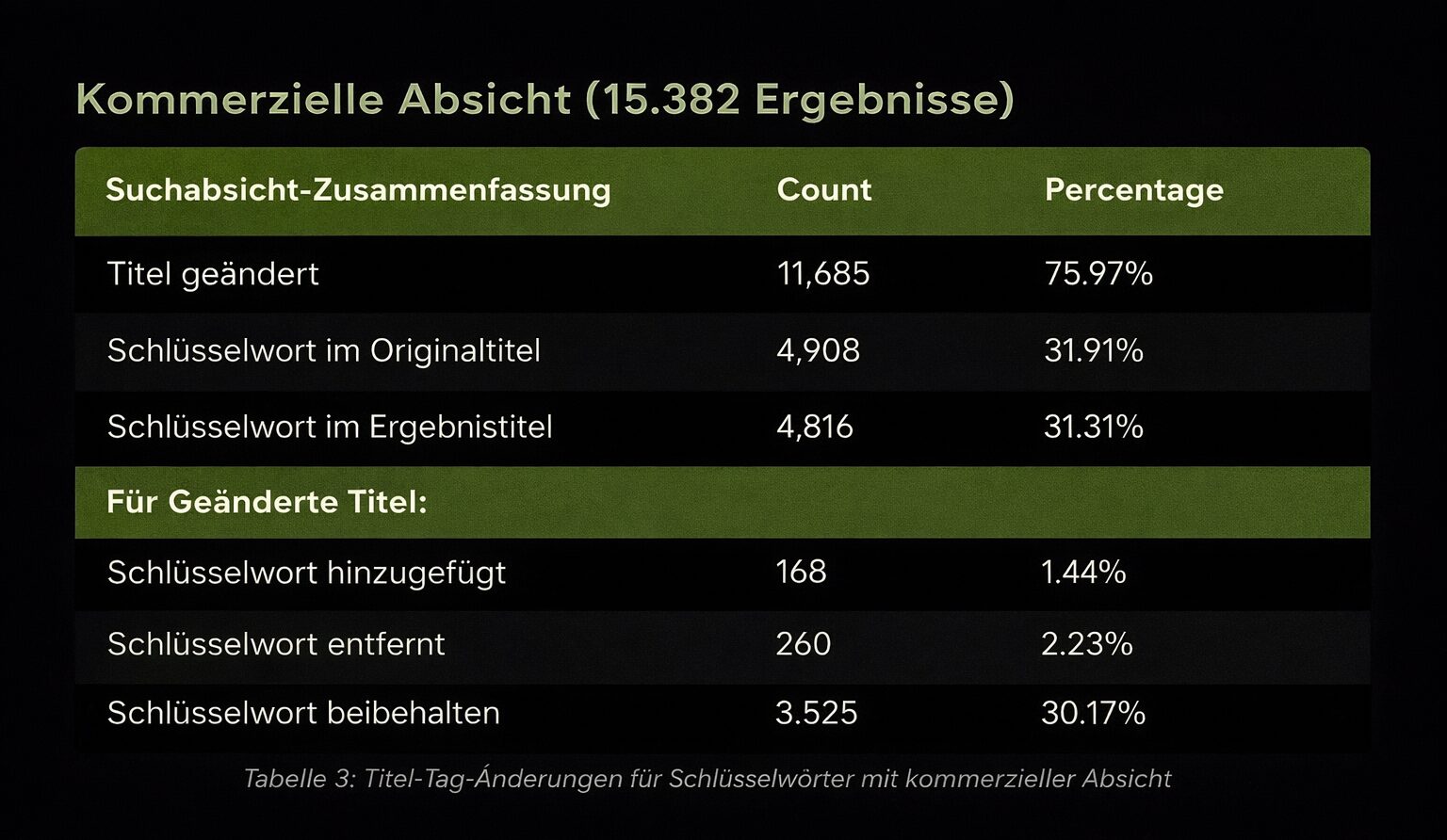
Google changes around 76% of title tags (Q1 2025), and uses the supplied meta description in only around 28% of cases. Search Engine Land
Title tag: practical best practices
- Put the primary keyword and a clear benefit up front.
- Stay at around 55 to 60 characters in order to avoid truncation.
- Mirror the search intent; align closely with the H1 in order to reduce Google’s rewrites.
- Use a modifier (for example “checklist”, “2025 guide”, “step by step”).
- Make every title unique; avoid templates, ALL CAPS and keyword stuffing.
- Add numbers or time frames when they clarify the value (no clickbait).
- Put your brand at the end, but only if there is space left.
Meta description: practical best practices
- Aim for around 150 to 160 characters; write in the active voice.
- Include the primary keyword naturally (it helps with bolding and relevance).
- Preview the value clearly: problem, outcome, next step.
- Use a differentiator (for example “examples”, “templates”, “free checklist”).
- Avoid quotation marks that could disturb the display; keep every description unique.
- Keep the promise made in the title: consistency lifts CTR and reduces rewrites.
Use these starter templates (keep your focus keyword at the front)
- TitleOn-page optimisation: [primary benefit] for [target audience]
- MetaLearn to structure content, polish metadata and build internal links so that your pages rank and convert, step by step, with no jargon.
Example pairs (plug and play)
- Title: On-page optimisation: faster rankings for small businesses Meta: Structure content, refine titles and descriptions and repair internal links so that your pages rank: clear steps, plain English, no filler.
- Title: On-page optimisation checklist: 12 steps for e-commerce teams Meta: Use clean URLs, concise snippets and smart linking to win more product clicks and conversions: actionable tips for today.
Keep it simple, honest and human. A strong promise in the title, a clear preview in the description and a readable URL: that is how you create a snippet people trust and click.
Heading structure (H1 to H6) and formatting
Heading structure is the hierarchical outline (H1 to H6) that organises your page for readers and search engines.
Use exactly one H1 that reflects the main intent, and sketch out your story with H2 for main sections and H3/H4 for details. Place important terms up front where it feels natural, write headings like signposts (not keyword lists) and keep the body copy scannable with short paragraphs, bullet lists and targeted emphasis.
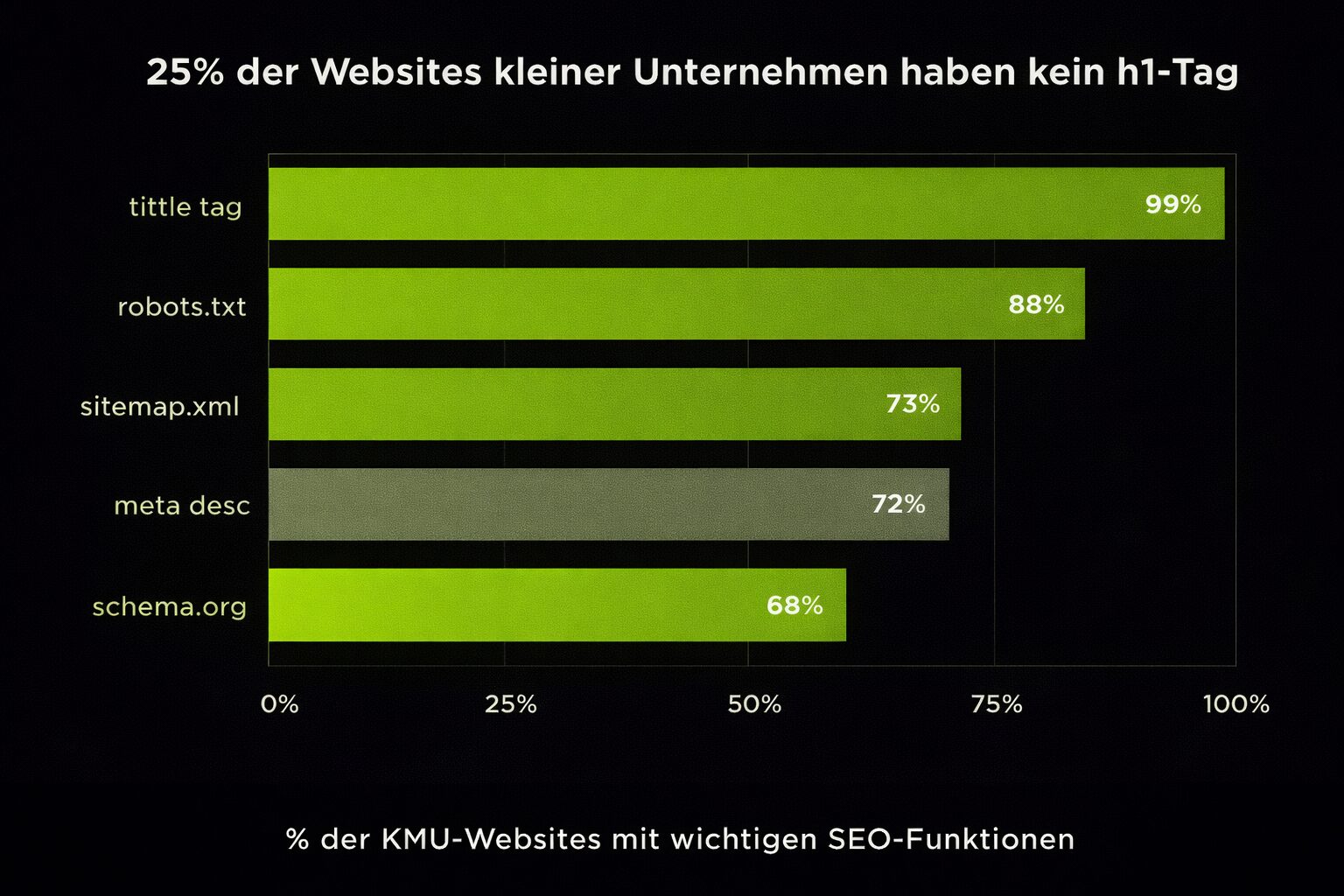
25% of small business websites have no H1 tag, as reported in Backlinko’s “SEO Statistics for 2025”. (Backlinko)
Practical best practices
- H1 (one per page)Match the intent, include the primary keyword early, stay human and specific (no templates), and align with the promise of the title tag.
- H2 to H3 flowBreak the topic into clear, non-overlapping sections; use secondary and related keywords naturally in some subheads; keep the levels logical (do not jump from H2 to H4).
- Clarity before densityIf a keyword makes the heading unwieldy, rephrase it. Prefer plain English, outcomes and the real questions users ask.
- Format for scannabilityShort headings, consistent capitalisation and targeted emphasis. Use bullet lists and keep the paragraphs under each subhead compact.
- Accessibility and semanticsNo “faked” headings made from styled paragraphs or images; use the correct tags, preserve the order (H1, H2, H3 and so on) and make sure important sections are reachable via headings.
- Template hygieneAvoid duplicate H1s created by page builders or themes; check a few templates to see whether the outline renders correctly on mobile and desktop.
Content quality and relevance
Content quality and relevance describe how completely and helpfully a page solves the searcher’s task: matched to the intent, backed by evidence and easy to consume.
“Helpful, specific, complete” is the benchmark. Cover the problem, the approach and the evidence, so that readers feel “finished” without having to leave for missing details. Use examples, mini checklists and plain English. Cut filler words, keep ideas compact and link to credible sources when a claim needs evidence.
Search intent and user expectations
Match what the query actually wants, and structure the page so that the result arrives quickly.
- Know (informational)Answer first, then expand with steps, visuals and FAQs.
- Do (transactional)Place benefits, specifications, prices, trust signals and a clear CTA early.
- Compare (commercial)Use tables, pros and cons, alternatives and “when to choose” pointers.
- Find (navigational)Make the destination obvious; reduce distractions and provide jump links.
A practical routine: scan the top results, note the common sections and formats, and then go one step further with your own examples, screenshots or data. One intent per page: if your draft serves two goals, split it.
Multimedia content: images and videos
Use media in order to remove friction, not as decoration.
- ImagesCompress them, name the files descriptively, write meaningful alt text and add captions where they clarify context. Prefer your own screenshots, diagrams and short infographics over generic stock images.
- VideosEmbed concise explainers where they replace long paragraphs (setup, how-to, demo). Add a transcript, timestamps and clear next steps near the player.
- Performance and UXPrefer modern formats (for example WebP), lazy-load assets below the fold and keep aspect ratios consistent so that layouts do not jump.
Readability and formatting
Make the page easy to scan and pleasant to read.
- Start with the most useful part (the inverted pyramid).
- Keep paragraphs lean (3 to 5 lines), vary sentence lengths and use the active voice.
- Use subheads, bullet lists and targeted emphasis in order to make key points visible.
- Replace abstractions with concrete examples and mini checklists.
- Edit once for clarity (remove filler) and once for flow (transitions, rhythm).
When your content answers the right question clearly, and shows evidence with examples or media, you satisfy users and set the rest of your on-page work (headings, metadata, internal links) up to actually take effect.
SEO-friendly URLs and slugs
SEO-friendly URLs are short, human-readable addresses that describe the page clearly and reflect your website’s structure for users and search engines.
Do not cram your entire headline into the slug. Keep it clean and purposeful, so that people can guess the content before they click, and so that your links are easy to share and remember.
Expert tip
Many blogs and forums use the “bare” URL as the link text; a concise, keyword-adjacent slug gives you anchor text that genuinely reinforces relevance.
From our day-to-day client work
Why readable URLs work
- They communicate immediately what the page is about
- They are easier to remember and to paste into chats and emails
- They are more likely to be linked with meaningful anchor text (often the bare URL)
Best practices
- Keep it as short as possible, but descriptive
- Use lower case and hyphens to separate words (/on-page-optimization-checklist)
- Include the primary keyword once; no stuffing and no filler words
- Reflect a logical hierarchy (for example /seo/on-page/title-tag/)
- No dates or years unless necessary; keep slugs future-proof
- Avoid special characters, accents, capitals or underscores
- Prefer clean slugs (no file extensions such as .html)
- Keep trailing slashes consistent site-wide (choose one convention)
- Keep one canonical version (http to https, non-www to www or the other way round)
- Minimise query parameters in indexable URLs; canonicalise or filter where needed
- If you have to change a slug: set up a 301 redirect from the old URL and update internal links and sitemaps
| Good | Bad |
|---|---|
/on-page-optimization-checklist |
/how-to-do-on-page-optimization-for-2025-with-semrush-ahrefs |
/seo/on-page/title-tag/ |
/seo/onpage/the-title-tag-of-my-dreams-and-why-its-awesome/ |
SEO-friendly URL examples
Internal and external linking strategy
Linking strategy describes how you connect pages internally and cite trustworthy sources externally, so that users find the next step and search engines understand topical relationships.
Link to related pages from introductions, conclusion blocks and “read more” areas in order to distribute authority and steer journeys. Use external links when a reputable source provides evidence or clarity.
Internal links: practical measures
- Plan hubs to spokes: pillar pages link to deep dives; deep dives link back to the hub.
- Link from high-authority pages to new or underperforming pages in order to pass on equity.
- Link to the canonical URL (not to redirects or parameter variants).
- Use breadcrumbs and “related content” that reflect real topic clusters.
- Regularly repair dead or outdated links; update them when pages move.
External links: use them deliberately
- Cite credible, topically close sources; avoid low-quality or spam sites.
- Open in a new tab when it improves the UX.
- Mark paid placements with rel=”sponsored” and user-generated links with rel=”ugc”; when in doubt, use rel=”nofollow”.
Best practices for anchor text
Write anchors so that they describe the destination, not “click here”. Keep them natural, varied and human.
- Prefer descriptive phrases (“on-page checklist”, “schema markup guide”).
- Match the anchor’s tone to the page type (softer for editorial, clearer for product or CTA).
- Avoid over-optimising the same exact anchor text across many links.
- Integrate anchors readably into the flow of the sentence; if it is clumsy, rewrite the sentence.
Orphan pages and crawl depth
No page should be an island.
Every important URL needs at least one contextual internal link in and back out, plus a path in the navigation or breadcrumbs.
Aim for a flat structure, within around 4 clicks of the home page, so that users and crawlers reach content quickly. Use a crawler to find orphans, then link them from suitable hubs, category pages and fresh content.
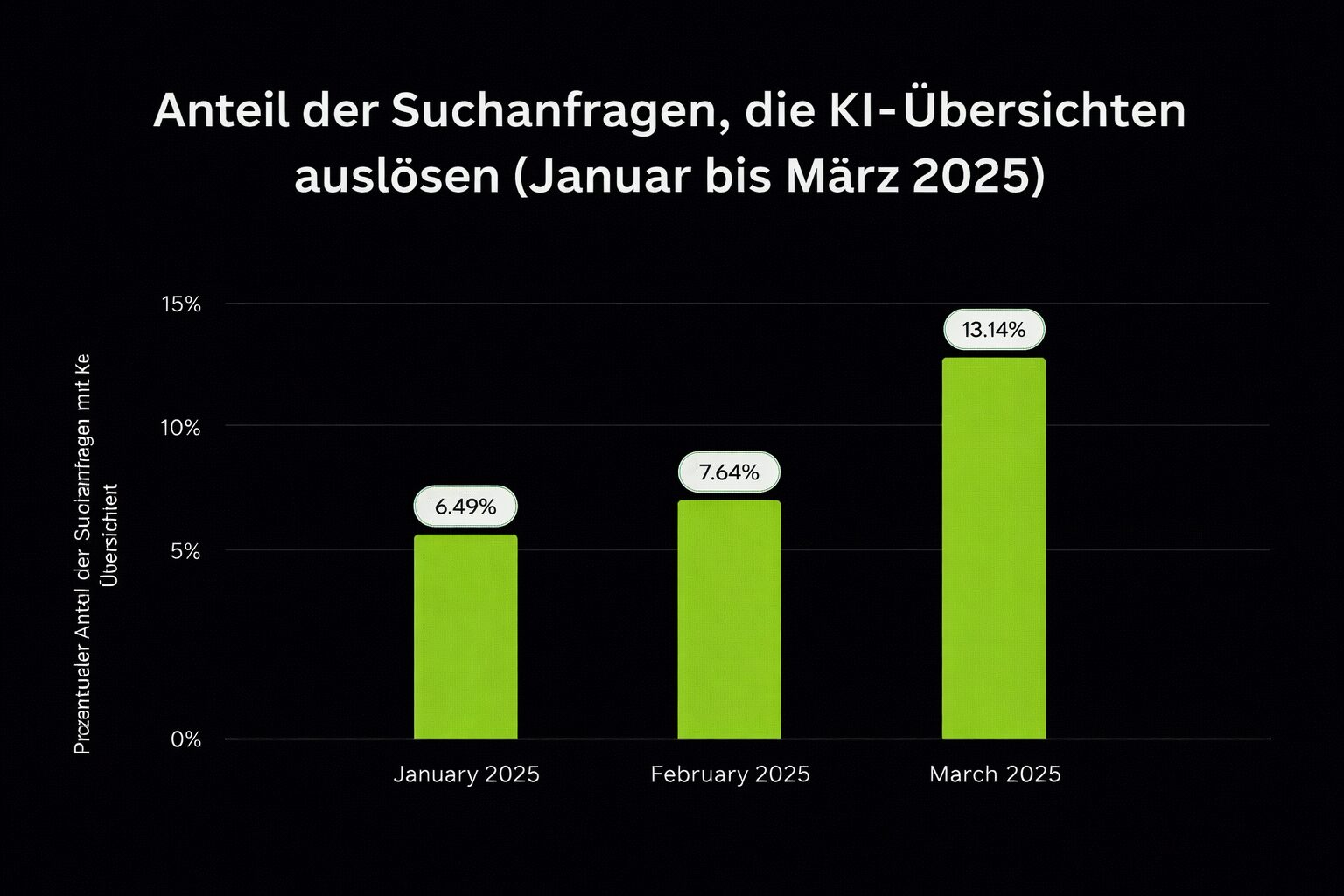
Semrush’s March 2025 study found that AI Overviews appeared on around 13.14% of queries and that zero-click rates fell from 38.1% to 36.2%: good content and clear snippets still pick up clicks. Semrush
Optimising content for commercial and e-commerce pages
Commercial content helps visitors evaluate, compare and buy (product and category pages, service pages, pricing, comparisons).
Unlike purely informational posts, commercial pages have to do three jobs at once: answer key questions, remove doubts and make the next step obvious. Place evidence (reviews, stars, trust signals) where the eye lands first, keep specifications scannable and tie a benefit to every feature.
- Start with the problem your product or service solves, then show the benefit in one concise sentence.
- Add comparison blocks (“vs” tables, bundles) so that evaluators stay on your page.
- Build in FAQs that reflect objections from sales and support.
- Place social proof near the CTAs (recent reviewers, “bought X times in the last 24 h”).
Chapter summary
- One primary topic per page, plus 3 to 6 closely related phrases, placed where they serve clarity.
- Title tag, meta description and URL together form the SERP snippet: around 55 to 60 characters in the title, 150 to 160 in the description.
- Exactly one H1 per page, with a logical H2/H3 structure underneath and no skipped levels.
- Keep slugs short, lower case and hyphenated; if you change one, set up a 301 and update internal links and sitemaps.
- Every important URL needs internal links in and back out, and should sit within around 4 clicks of the home page.
Free, no obligation
Where does your website actually stand?

We look at your rankings, your technical setup and your visibility in AI answers, then tell you which lever moves the needle next.
How does technical SEO influence on-page optimisation?
Technical SEO is the foundation: if Google cannot crawl, index or render your page quickly on a phone, great content will not rank. Treat performance, mobile, security and structured data as on-page accelerators.
Make sure crawlers can access and index
Crawlability means whether bots can access your pages; indexability means whether those pages qualify to be stored and displayed in search.
Common mistake
The crawl budget is finite. Help bots take the shortest route to important URLs, and avoid dead ends.
- Allow important paths in robots.txt; disallow only what is genuinely private.
- Keep XML sitemaps clean (status 200, canonical URLs only) and reference them in robots.txt.
- Use noindex for thin or duplicated utility pages; combine it with internal links to the canonical source.
- Fix redirect chains (one hop or fewer); link to the final, canonical destinations.
Prioritise speed (Core Web Vitals)
Page speed is how quickly content loads and responds; Google measures it with Core Web Vitals such as LCP, CLS and INP.
Speed shapes UX and your chance of maximum visibility. Concentrate on the biggest levers: fewer bytes, fewer requests, faster servers.
- Ship fewer, smaller files (minify, compress, defer). Convert images to AVIF/WebP; size and preload hero media.
- Eliminate render-blocking JS/CSS; split bundles and remove unused code.
- Cache cleverly (HTTP caching, CDN) and lower TTFB with edge delivery.
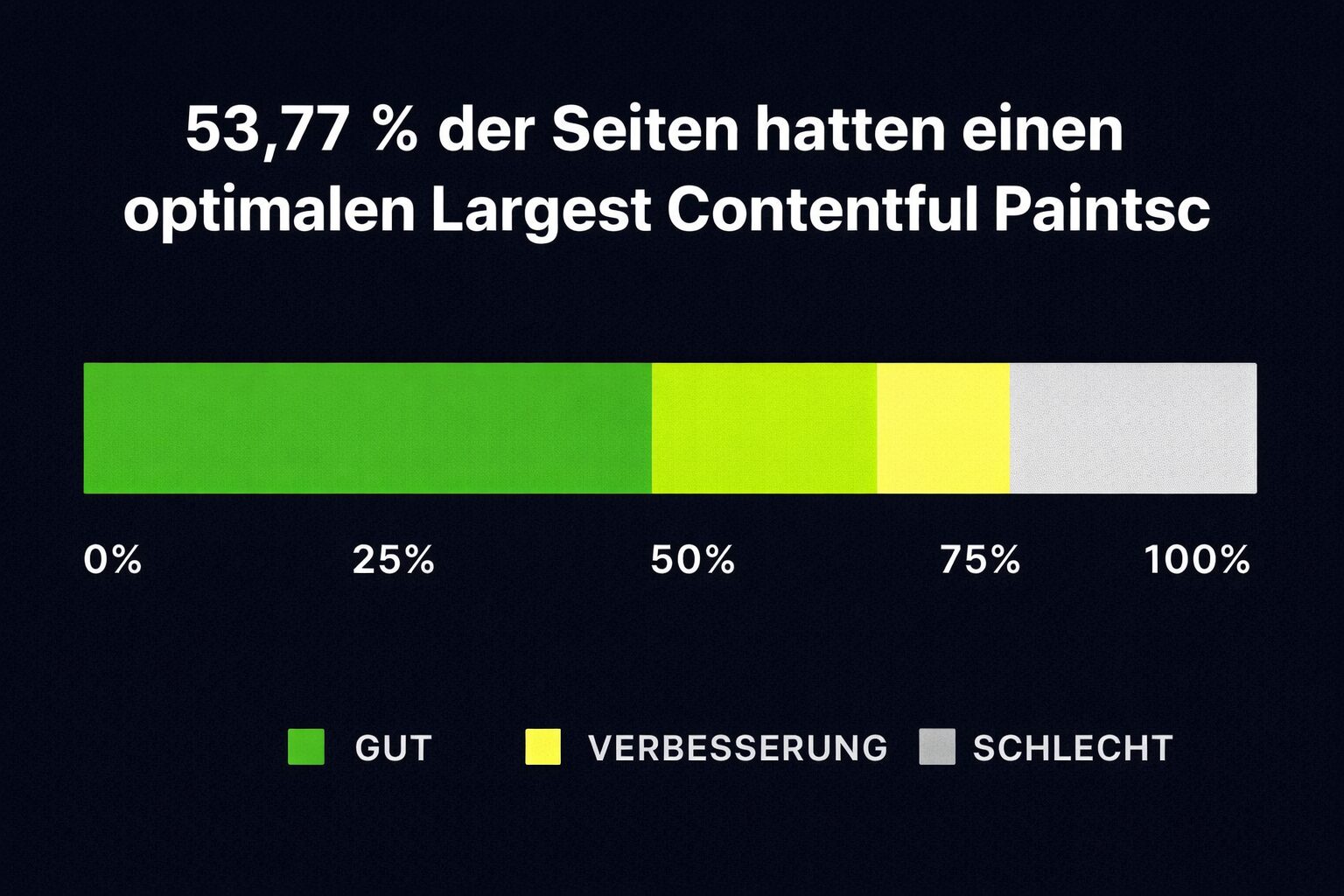
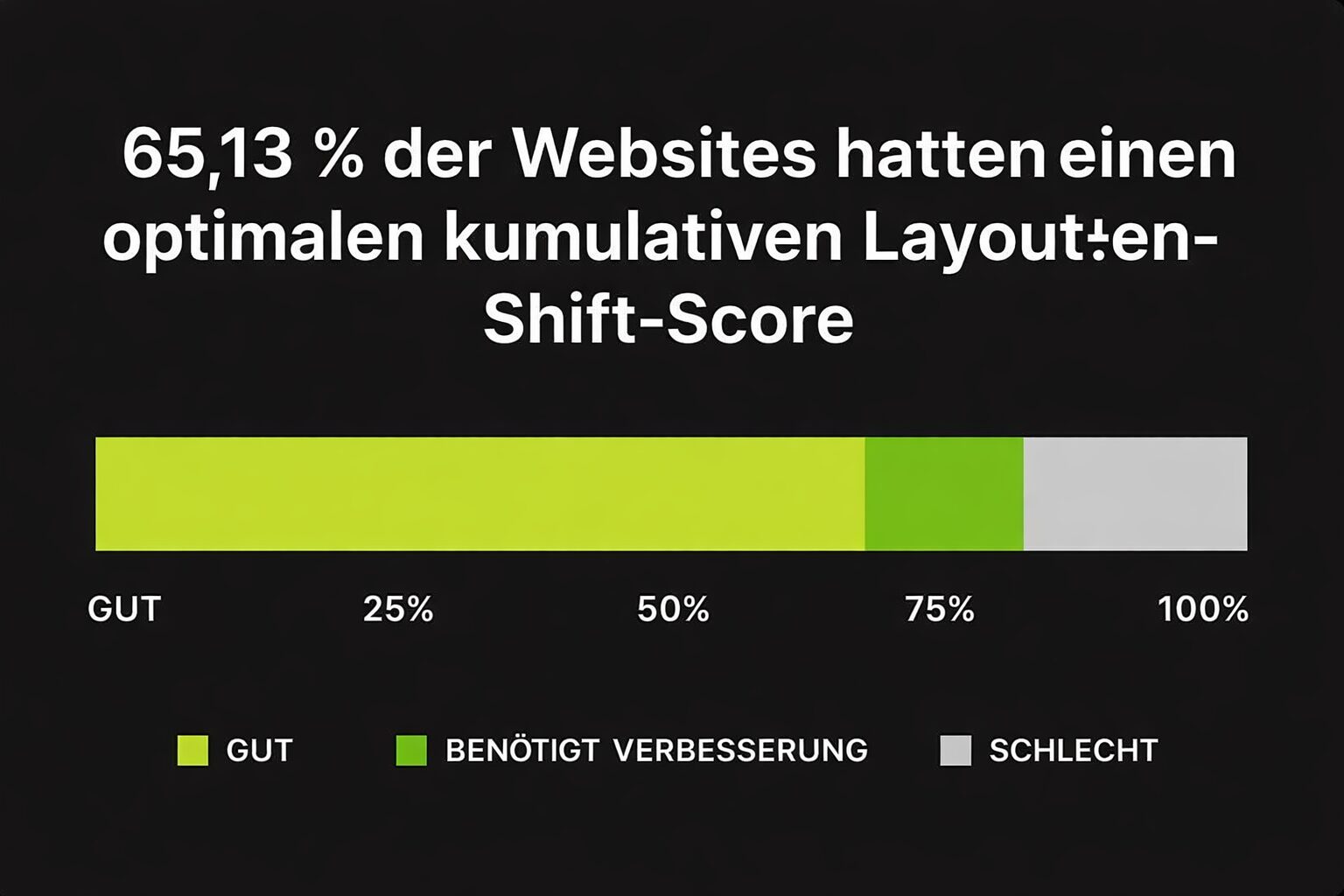
Large images, unused JS and render-blocking resources slow pages down. Backlinko’s 2025 Core Web Vitals study (208 k pages) found around 53.8% with good LCP and 65% with good CLS, but heavy pages remain the main reason for poor LCP: load less, paint faster. (Backlinko)
Design for mobile first
Mobile first means designing layouts, tap targets and content hierarchy primarily for smartphones, where most searchers are.
Prioritise legible typography, generous spacing and thumb-friendly actions. Simplify the navigation, collapse anything unimportant and shorten forms.
- Use a single, fixed main CTA; tap targets of 44 px or more.
- Trim carousels and heavy embeds; lazy-load assets below the fold.
- Test on real devices, not just in a responsive iframe.
Mobile now accounts for 83.58% of all Google visitors (Semrush, via Backlinko). That is the audience you design for first.
Source: Backlinko
Secure the site with HTTPS
HTTPS encrypts data in transit and is a basic trust and ranking signal.
Modern browsers mark non-HTTPS pages as “not secure”, which harms clicks and conversions. Use automatic certificate renewal and force a 301 from HTTP to HTTPS.
- Activate HSTS; switch all internal links to HTTPS.
- Fix mixed content (HTTP images or scripts on HTTPS pages).
- Regenerate sitemaps and resubmit them after the switch.
A 2025 figure: around 87.7% of websites now use HTTPS, which makes it the standard your audience expects. (explodingtopics.com)
Use structured data (schema) to clarify meaning
Structured data is machine-readable markup (usually JSON-LD) that labels entities such as Product, Article, FAQ, Review and Event.
Schema does not “rank” you on its own, but it unlocks rich results that increase visibility and clicks, especially on product and local pages.
- Mark up the right types (Product, Organization, Breadcrumb, FAQ, HowTo, LocalBusiness).
- Keep values honest and in sync with the on-page content (prices, availability, ratings).
- Validate in Google’s Rich Results Test; monitor enhancements in Search Console.
- For e-commerce, combine Product + Offer + AggregateRating in order to produce strong snippets.
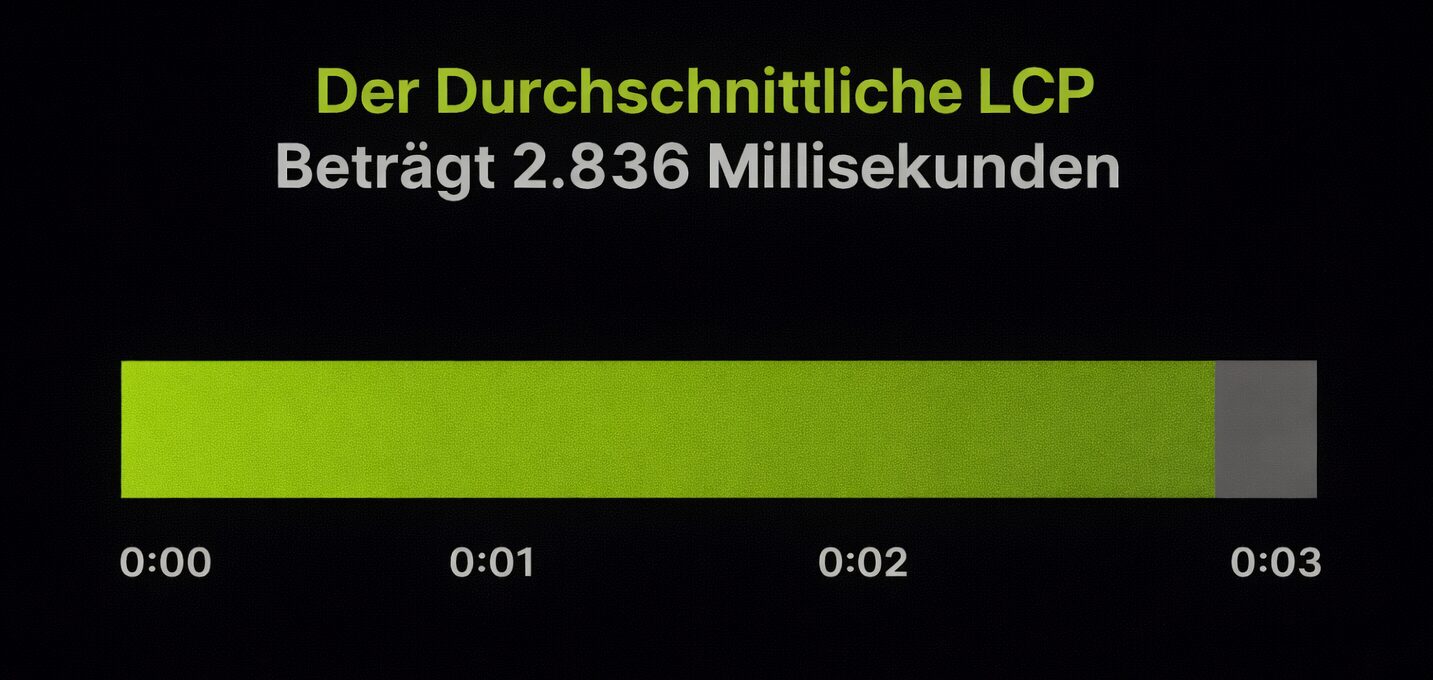
Backlinko’s Core Web Vitals analysis names an average LCP of around 2.8 s across the data set; getting under 2.5 s earns you a “good” rating plus noticeably better UX and ranking potential. (Backlinko)
Which user-centred elements influence on-page SEO?
Great pages feel intuitive: accessible, action-friendly and visually calm. Think of design and UX as ranking multipliers.
Accessibility (WCAG) from the start
WCAG is the standard that makes sure people with disabilities can perceive, operate and understand your content.
Accessible pages are easier for people and for machines.
Good semantics clarify meaning for screen readers and search engines.
- Provide alt text that describes the purpose, not just the appearance.
- Maintain high colour contrast; never convey meaning through colour alone.
- Use real buttons and links (not styled <div>s) and a logical heading order (H1, H2, H3).
- Ensure focus states and keyboard navigation for all interactive elements.
Encouraging interaction: CTAs, comments and shares
Interaction elements trigger actions (clicking, commenting, sharing), so that engaged readers do not “bounce and forget”.
Make the next step frictionless and contextual. Use verbs with an outcome promise (“get the checklist”, “compare plans”) instead of vague nudges. If you enable comments, reply within 24 to 48 hours: momentum counts.
- Place one primary CTA above the fold; repeat a lighter variant at the end of sections.
- Prompt comments with a concrete question (“which single metric do you check after publishing?”).
- Keep share buttons lightweight and fixed on mobile; use UTM-tracked shares in order to understand reach.
Visual layout and user-friendly design
Short paragraphs, scannable subheads and consistent spacing beat walls of text. Evidence counts here too: BrightEdge found that shopping signals such as “buy online” can raise a brand’s recommendations in AI Overviews by 33.9 percentage points, which is an argument for clear CTAs and trust cues. (BrightEdge)
Backlinko’s 2025 overview confirms that the result in position 1 achieves around 27.6% CTR: your UX helps you conquer that spot (and keep it). (Backlinko)
How do you optimise on-page elements for different page types?
Different page types = different intents. Adapt structure, content blocks and calls to action accordingly.
| Aspect | Blog article / informational | Product and category (e-commerce) | Landing pages (lead gen) |
|---|---|---|---|
| Primary goal and intent |
|
|
|
| Must-have elements |
|
|
|
| CTA and next steps |
|
|
|
| Tips for internal links |
|
|
|
| Recommended schema |
|
|
|
On-page optimisation by page type
Blog articles and informational content
Start with the problem and the promise, then deliver steps, visuals and evidence. Use FAQ schema for common questions and link to deeper resources. Finish with a soft CTA (newsletter, template, checklist).
Product and category pages (e-commerce)
Put benefits and key specifications up front, and build in comparison blocks, reviews, FAQs and strictly optimised media (alt text plus lazy loading). Use structured data (Product, Offer, Review) and link internally from category to product and back.
Backlinko reports that global retail e-commerce revenue in 2025 is expected to be around €5.9 trillion, so there is real potential for product pages that are fast, descriptive and trustworthy. (Backlinko)
Landing pages for lead generation
Match the promise from the ad or query in the hero, thin out the navigation, place social proof near the forms and ask only for essential information. Test a short form plus “what happens next” microcopy.
Ahrefs observed that AI referrals, although small in number, convert 23 times better than traditional organic traffic. Optimise the form UX and track those sources; users with high purchase intent deserve a frictionless path. (Ahrefs)
Chapter summary
- Crawlability and indexability come first: allow important paths in robots.txt, keep XML sitemaps clean, use noindex only for thin utility pages and cut redirect chains to one hop or fewer.
- Core Web Vitals as the target: LCP under 2.5 s and CLS under 0.1, with fewer bytes, fewer render-blocking resources and clever caching.
- Design for mobile first: 83.58% of all Google visitors arrive on a phone, and with around 87.7% adoption HTTPS is long since the standard.
- Accessibility pays straight into SEO: alt text that describes the purpose, real buttons and links, high contrast and a logical heading order.
- Every page type needs its own building blocks: blog articles inform, product and category pages convince, landing pages convert.
Which tools help with on-page analysis and implementation?
Use one platform for research and monitoring, a crawler and a performance stack, and document your checklist so that all pages ship consistently.
SEO audit and monitoring tools
Semrush and Ahrefs uncover technical issues (titles, duplicates, CWV notices), track rankings and show intent gaps. Keep permanent monitoring active in order to spot regressions quickly.
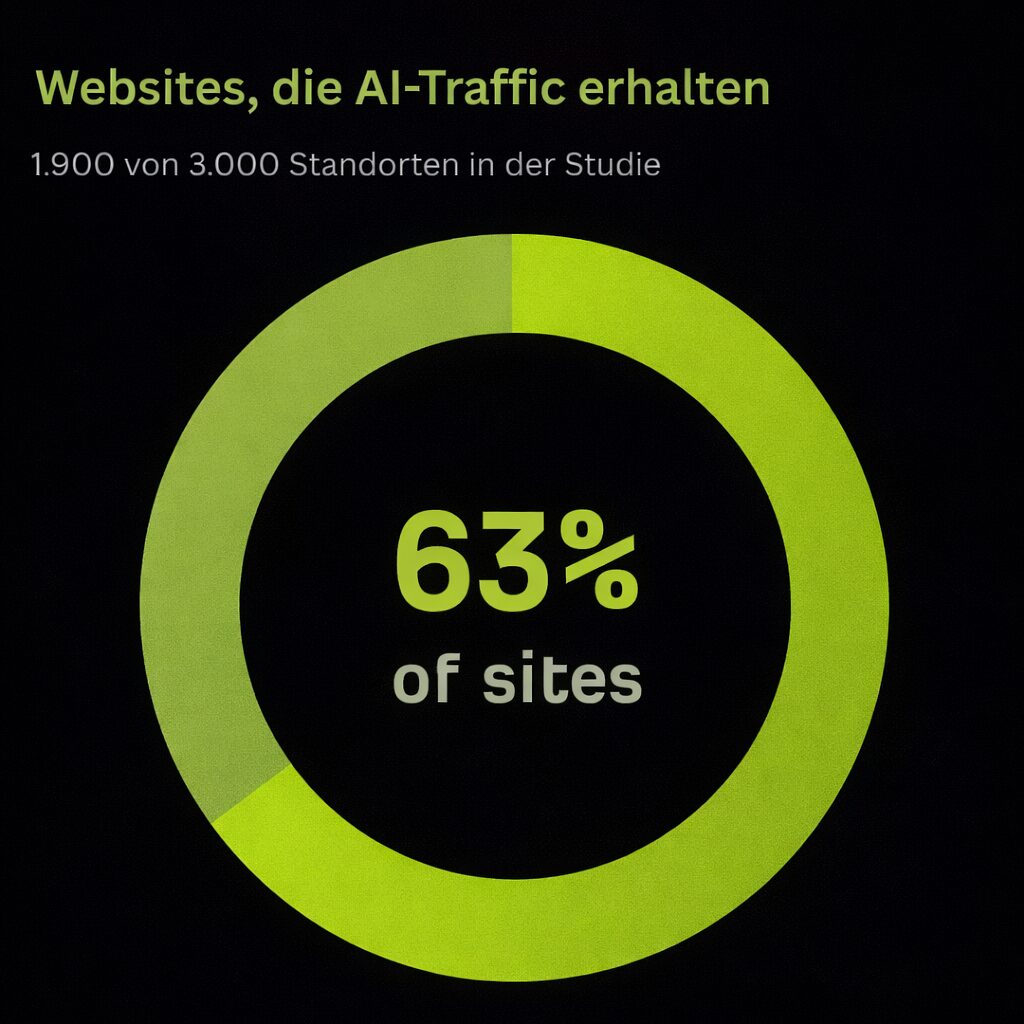
Ahrefs’ research shows that 63% of websites now receive AI traffic and that ChatGPT drives over 80% of AI referrals, which is another reason to watch unconventional sources in your analytics and to optimise your on-page content for how answers are cited. (Ahrefs)
Keyword research and content tools
Semrush (Keyword Magic), Ahrefs (Keywords Explorer) and Backlinko’s frameworks and templates help you organise topics, cluster intents and find content gaps you can genuinely win.
Technical SEO and performance checkers
Crawl with Screaming Frog or Site Audit; measure with PageSpeed Insights and the Chrome UX Report; check markup with the Rich Results Test. Fix the biggest problem areas first (images, JS, server TTFB).
Chapter summary
- Semrush and Ahrefs uncover technical issues, track rankings and show intent gaps, with permanent monitoring so that regressions surface early.
- Keyword Magic, Keywords Explorer and Backlinko’s frameworks help you cluster topics and find content gaps you can genuinely win.
- Screaming Frog or Site Audit for crawling, PageSpeed Insights and the Chrome UX Report for measuring, the Rich Results Test for markup.
What is a practical checklist for on-page optimisation in 2025?
Think of it as a repeatable pre-publish routine and a quarterly tuning list.
A quick audit check for every new page
- Intent checkOne primary topic plus a clear outcome.
- Title and H1Unique, benefit-led, with the primary keyword.
- Meta descriptionA convincing benefit plus the next step.
- HeadingsA logical H2/H3 map; no filler subheads.
- CopyHelpful, concrete, skimmable, with examples.
- MediaCompressed images, descriptive alt text, lazy loading.
- URLShort, readable, hyphenated.
- Links2 to 4 internal links in, 3 to 6 out to relevant pages; no orphans.
- SchemaProduct/FAQ/HowTo/Article depending on the page.
- PerformanceLCP < 2.5 s, CLS < 0.1, mobile responsive.
Maintenance tasks for existing content
- Quarterly updateRefresh figures, screenshots and CTAs; expand thin sections.
- Keyword driftCheck whether the page still matches the queries it wins (or the ones you want).
- Cannibalisation checkMerge overlapping articles; redirect sensibly.
- Link hygieneReplace dead links; set new internal links from fresh pieces.
- SERP snippet tuningTest alternative titles and metas in order to lift CTR.
Because around 27.6% of clicks go to the number 1 result, even small CTR gains from better titles and metas can mean large traffic gains. Prioritise the pages with the greatest potential. (Backlinko)
Frequently asked questions
What is on-page optimisation?
On-page optimisation is the practice of improving a single page, its content, structure, metadata, internal links, speed and accessibility, so that search engines understand it and people prefer it. Unlike off-page work, all of it happens on the page itself.
Where does the primary keyword belong?
In the title tag (ideally well towards the front), in the meta description, in the H1, in the first 100 to 150 words, in one fitting subheading, in the URL slug and in the alt text of the first image. Add 3 to 6 closely related phrases that you place naturally in the body copy, in selected H2/H3 and in internal anchor text.
How long should a title tag and a meta description be?
Around 55 to 60 characters for the title tag and around 150 to 160 characters for the meta description. Google still changes around 76% of title tags (Q1 2025) and uses the supplied meta description in only around 28% of cases; aligning the title closely with the H1 reduces the number of rewrites.
What is keyword cannibalisation and how do I fix it?
Cannibalisation happens when two pages target the same search intent. You identify the overlap, choose the URL with the strongest equity as the winner, consolidate the unique sections of the weaker page there, 301 the retired URL, realign the internal links and watch the rankings for a few weeks.
How many H1 headings may a page have?
Exactly one. It reflects the main intent of the page and matches the promise of the title tag. Below it, H2 structures the main sections and H3/H4 the details, without skipping levels. According to Backlinko’s “SEO Statistics for 2025”, 25% of small business websites have no H1 tag at all.
Which Core Web Vitals values count as good?
The targets are an LCP under 2.5 seconds and a CLS under 0.1, plus a mobile responsive layout. In the data set of Backlinko’s Core Web Vitals study the average LCP is around 2.8 seconds; around 53.8% of pages reach a good LCP and 65% a good CLS.
What is an orphan page?
A page that no internal link points to. Every important URL needs at least one contextual internal link in and back out, plus a path in the navigation or breadcrumbs, and it should sit within around 4 clicks of the home page. You find orphans with a crawler and then link them from suitable hubs, category pages and fresh content.
Which tools do I need for on-page analysis?
One platform for research and monitoring (Semrush or Ahrefs), a crawler (Screaming Frog or Site Audit) and a performance stack (PageSpeed Insights, Chrome UX Report, Rich Results Test). On top of that comes a documented checklist, so that all pages ship consistently.
Ready for more revenue?
Book your SEO & GEO audit
Find out in a free call how much revenue your website is leaving on the table, with no obligation and no agency waffle.